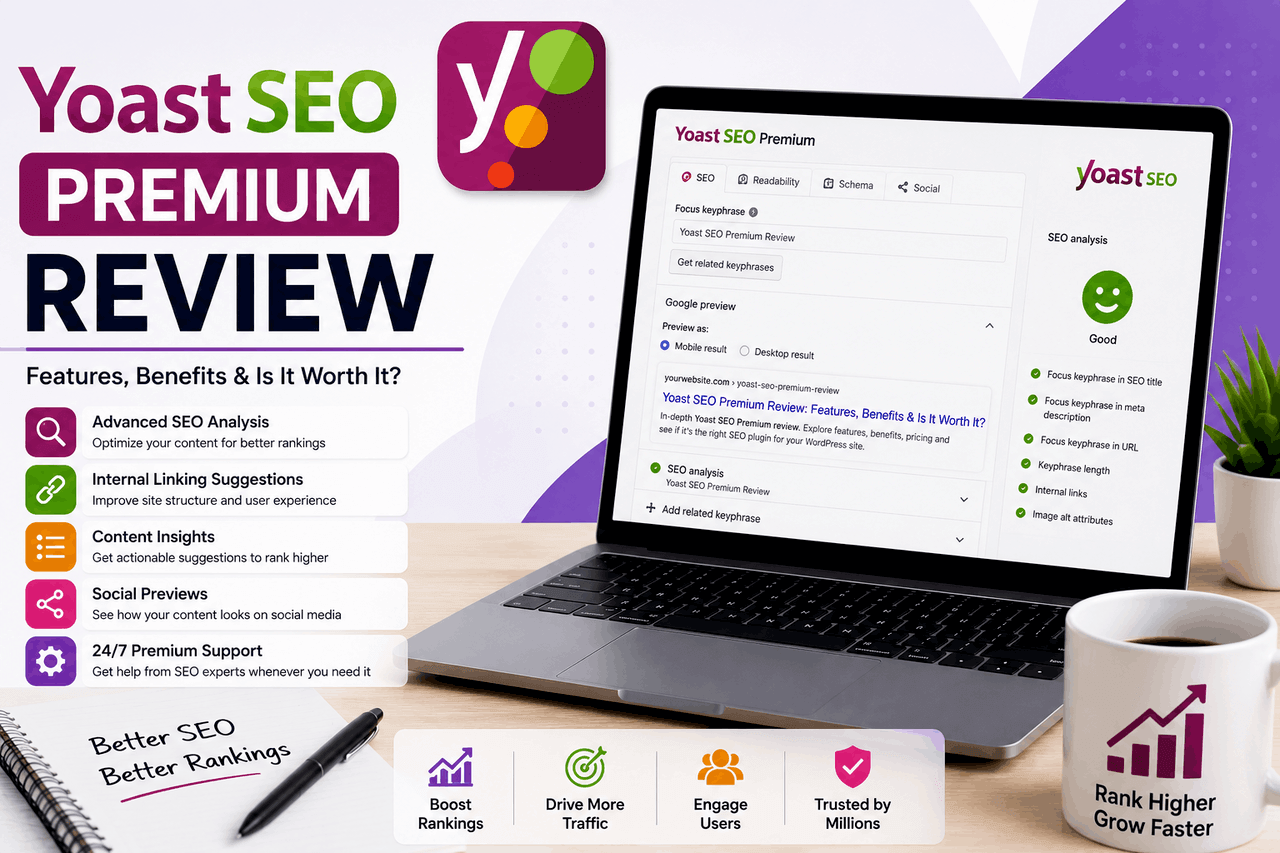
Yoast SEO Premium is a paid WordPress plugin that automates technical website maintenance and improves content relevance. Choose Yoast SEO Premium if you regularly publish blog posts, delete old pages, or manage an e-commerce store, as the included redirect manager and internal linking tools save hours of manual site updates.
In the world of website management, standard search engine tools act like a trusty compass. They point you in the general direction of good website traffic. Yoast SEO Premium acts as a complete GPS navigation system. It actively guides your content strategy and automatically reroutes your website visitors when a page goes missing.
Managing a growing website requires constant maintenance. You have to write new blog posts, update old articles, and delete outdated product pages. When you handle these tasks manually, you often create broken links or write content that search engines fail to understand. Yoast SEO Premium exists to solve these exact problems. It is a paid upgrade to the widely used free Yoast SEO plugin, designed specifically for WordPress websites.
If you run a small personal blog with ten posts, the free version of Yoast SEO provides enough guidance to get your site indexed by search engines. If you run a business website, an e-commerce store, or a high-volume blog, the manual work of search engine management quickly becomes a burden—Yoast SEO Premium steps in to automate the technical details so you can focus on writing content.
This review examines exactly what Yoast SEO Premium does, how much it costs, and who actually needs to pay for it. You will see the clear trade-offs between sticking with the free tools and paying for the premium upgrade.
What are the key features of Yoast SEO Premium?
Yoast SEO Premium adds several advanced tools to the standard WordPress plugin. Each feature targets a specific administrative task that normally drains time from website owners.
How does keyword analysis work for multiple search terms?
The free version of Yoast SEO allows you to target one specific search phrase per page. Yoast SEO Premium allows you to target up to five related keywords or synonyms on a single page. This helps you write more naturally. Instead of repeating the same phrase over and over, you can use variations of your main topic. The plugin then analyses your text to ensure search engines understand that these different terms all relate to the same central subject.
How does the readability analysis improve user experience?
Search engines prioritize websites that humans actually enjoy reading. Yoast SEO Premium analyses your text using the Flesch reading ease score. It highlights passive voice, tracks sentence length, and flags paragraphs that run too long. If your writing becomes too academic or difficult to scan, the plugin tells you exactly which sentences to shorten. This keeps your website visitors on the page longer, which signals to search engines that your content is valuable.
How do internal linking suggestions improve site structure?
Website structure relies heavily on internal links. Yoast SEO Premium scans your entire website and provides real-time suggestions for linking to your other articles as you write a new post. You do not have to search your own archives to find relevant content. The plugin displays a list of related posts directly in your WordPress editor. You click a button to insert the link. This feature saves significant time for websites with hundreds of published articles.
What is the cornerstone content feature?
Every website has a few defining articles that attract the most traffic. Yoast SEO Premium calls this cornerstone content. You mark specific articles as cornerstone pieces within the plugin. The tool then monitors these posts to ensure they receive enough internal links from your newer articles. It also provides warnings if your cornerstone content becomes outdated and needs a refresh.
How does the redirect manager handle deleted pages?
The redirect manager is the most practical feature included in Yoast SEO Premium. When you delete a page on your website, visitors who click an old link will hit a 404 error. These errors frustrate users and harm your website’s standing with search engines. With the redirect manager, Yoast SEO Premium immediately detects when you delete a post. A prompt appears asking where you want to send visitors instead. You type in a new URL, and the plugin seamlessly forwards all traffic.
How do social media previews help with content promotion?
Sharing a link on social media often results in cropped images or cut-off headlines. Yoast SEO Premium includes a social preview tool for platforms like Facebook and X. You can see exactly how your post will appear before you publish it. If the image looks poorly framed, you can upload a specific replacement image just for social media.
Does Yoast SEO Premium include local SEO integration?
Yoast SEO Premium handles general website structure, but it does not include specific local business features out of the box. If you run a physical storefront, you need the Yoast Local SEO add-on. This separate plugin manages Google Maps integration, store hours, and geographical search data. Yoast SEO Premium lays the foundation, but the local add-on handles the neighbourhood-level data.
What are the main benefits of using Yoast SEO Premium?
The primary benefit of Yoast SEO Premium is time preservation. The plugin bundles a comprehensive toolkit directly into the WordPress dashboard. You do not have to log into five different software platforms to manage your site structure. Everything happens where you write your content.
The interface remains highly user-friendly for beginners and experts alike. Yoast uses a simple traffic light system. A green dot means your page is ready, an orange dot means it needs work, and a red dot means you have a critical error to fix. This visual system makes complex technical concepts easy to grasp.
You also receive dedicated support and continuous updates. When Google changes how it reads website data, the Yoast team updates the plugin to match those new rules. Suppose your plugin breaks or conflicts with another tool. Paying for Premium gives you direct email access to the Yoast support team. Free users must rely on public community forums for help.
What are the drawbacks and limitations of Yoast SEO Premium?
The most obvious drawback of Yoast SEO Premium is the cost. The plugin usually costs around $99 per year for a single website. If you manage five different websites, you have to buy a license for each one. This expense adds up quickly compared to free alternatives.
There is also a risk of over-analysis. The traffic light system can become an obsession. Website owners sometimes ruin perfectly good writing to turn every single dot green. You have to remember that the plugin is a machine reading your text, not a human. Sometimes a yellow dot is perfectly acceptable if the text reads well to your actual customers.
Advanced features also carry a slight learning curve. Setting up automated redirects or structuring cornerstone content requires understanding basic website architecture. If you activate these features without reading the documentation, you can accidentally send your website traffic in circles.
Who benefits most from paying for Yoast SEO Premium?
Bloggers and content marketers get the highest return on investment with Yoast SEO Premium. If you publish three articles a week, the internal linking suggestions alone will save you hours of manual searching.
E-commerce sites also see massive benefits. Online stores constantly add new products and delete discontinued items. The redirect manager ensures that shoppers looking for an old product get forwarded to a similar new item, rather than landing on a broken page.
Small to medium-sized businesses benefit from the clear, non-technical interface. A business owner without a dedicated marketing team can use the traffic light system to keep their website healthy.
Search engine agencies also use Yoast SEO Premium across client sites. The tool provides a standardized way to ensure every client website follows the same technical rules.
How does Yoast SEO Premium compare to free alternatives?
The free version of Yoast SEO remains excellent for basic website indexing, but it lacks the redirect manager and multiple keyword features. Competitors like Rank Math and All in One SEO offer compelling alternatives. Rank Math actually allows multiple keyword targeting in its free version.
Yoast SEO Premium retains a major advantage in its redirect manager and its sheer stability. Yoast has existed for over a decade. It rarely breaks your website during an update. Choose Yoast SEO Premium if reliability and the redirect manager matter more to you than saving a few dollars a month.
How do you install and set up Yoast SEO Premium?
Installing Yoast SEO Premium takes about five minutes. After purchasing your license, you download a zip file from the Yoast website. You log into your WordPress dashboard, navigate to the Plugins menu, and click “Upload Plugin.”
Once activated, the plugin prompts you to connect your website to your MyYoast account. This verifies your license. You then run the setup wizard. The wizard asks a few simple questions about your website type and automatically configures the technical settings based on your answers.
How can you get the highest return on your Yoast SEO Premium investment?
To get your money’s worth, you have to use the tools provided actively. Do not just look at the green dots. Use the redirect manager every time you update your website architecture. If you notice an old post isn’t getting any traffic, delete it and redirect its URL to a newer, better post.
Pay attention to the internal linking suggestions on every single post. Adding three relevant internal links to every new article strengthens your website’s entire network. If you ignore the suggestions panel, you are wasting a significant portion of the purchase price.
What are some real-world examples of Yoast SEO Premium success?
Consider a mid-sized e-commerce store selling seasonal clothing. Every winter, they delete hundreds of summer product pages. Before Yoast SEO Premium, this resulted in thousands of broken links and a drop in search rankings. After installing the plugin, the redirect manager automatically captured every deleted summer shirt and redirected traffic to the main winter catalogue. The store reduced 404 errors by 90% while maintaining year-round search traffic.
Similarly, a solo blogger with a five-year-old website used the cornerstone content feature to audit their archives. They identified 30 crucial articles buried under newer posts. Using the internal linking tool, they added fresh links to these older posts. This signalled to search engines that the old content was still relevant, resulting in a 25% increase in traffic to those specific pages.
Final verdict: Should you buy Yoast SEO Premium for your website?
Yoast SEO Premium is an excellent investment for active website owners. The cost is easily justified by the time saved on administrative tasks. The redirect manager acts as an insurance policy against broken links, and the internal linking tool acts as an automated assistant for your content strategy.
If you only update your website once a year, stick with the free version. The premium features require an active publishing schedule to provide real value. If you publish content regularly, update old pages, and want to keep your website technically sound without hiring a developer, Yoast SEO Premium is a tool you will use every single week.
FAQ about Yoast SEO Premium
How much does Yoast SEO Premium cost?
Yoast SEO Premium costs $119 per year for a single WordPress website license. You must renew the license annually to continue receiving software updates and access to the premium email support team.
Do I need the free version of Yoast installed to use Premium?
Yes. Yoast SEO Premium acts as an add-on to the core free plugin. You must have the free version of Yoast SEO installed and active on your WordPress website for the premium features to function correctly.
Does Yoast SEO Premium guarantee higher search rankings?
No software can guarantee a specific ranking on a search engine. Yoast SEO Premium provides the tools and suggestions to make your content as readable and technically sound as possible, which significantly improves your chances of ranking well.
Is the redirect manager difficult to use for beginners?
The redirect manager is highly intuitive. When you delete a page or change a URL, a pop-up box immediately appears, prompting you to enter the new destination URL. The plugin handles all the server-level code automatically behind the scenes.
Can I use Yoast SEO Premium on platforms other than WordPress?
Yoast SEO Premium was built specifically for WordPress. The company offers a separate app for Shopify users, but the standard Yoast SEO Premium plugin only works on self-hosted WordPress websites.