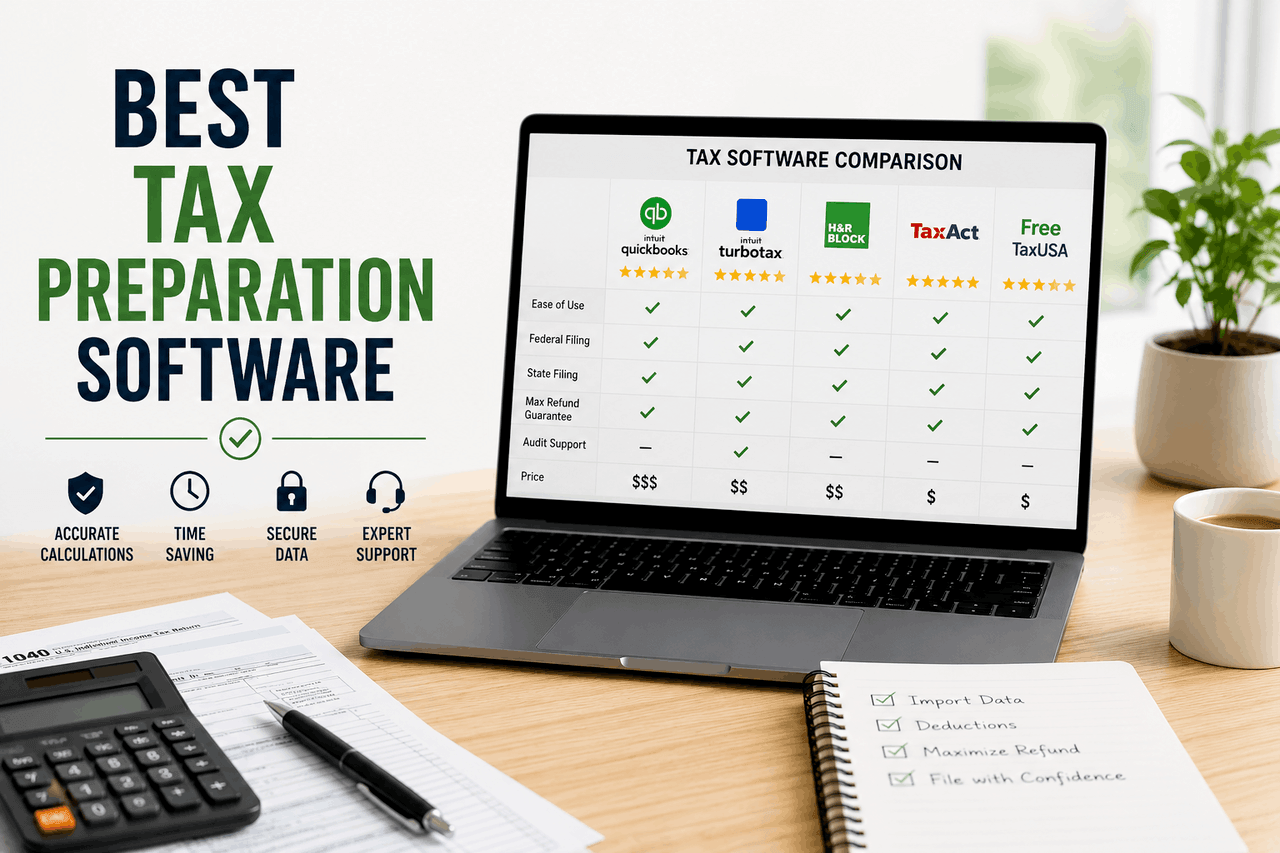
The best tax preparation software depends on your financial situation. Choose TurboTax if you have complex investments or business income and need extensive guidance. Opt for H&R Block if you want the option of in-person support. For simple W-2 returns, Cash App Taxes offers a completely free federal and state filing experience.
Tax season brings a familiar mix of stress and paperwork for millions of Americans. Gathering forms, tracking down receipts, and deciphering tax codes can quickly overwhelm even the most organized individuals. That means you likely need a reliable tool to help you navigate the process without paying more than you owe.
Tax preparation software serves as a digital accountant. It guides you through a series of questions, calculates your deductions, and files your return electronically. From simple tools for handling basic W-2 income to advanced software for managing corporate structures and international investments, there is an option for every taxpayer.
Finding the right platform saves you time and potentially increases your refund. This guide will walk you through the top tax software choices available today, helping you match the right features and price point to your specific financial situation.
What are your specific tax filing needs?
Before you compare software brands, you need to understand your own taxpayer profile. Different financial situations require different levels of support and different tax forms.
A standard W-2 employee with no dependents or investments has a very straightforward tax profile. That means you can usually file using basic, low-cost, or free software. Your main goal is simply getting the return filed quickly and accurately.
Freelancers and independent contractors face a more complicated process. If you receive 1099 forms, you must report self-employment income and track business expenses to lower your taxable income. You will need software that supports Schedule C forms and helps identify industry-specific deductions.
Small business owners and active investors have the most complex needs. If you run an LLC, trade stocks actively, or manage rental properties, you require advanced software tiers. These situations demand platforms capable of handling depreciation, capital gains, and potentially corporate tax returns. That translates to higher software costs, but the investment protects you from costly reporting errors.
What key features should you look for in tax software?
Not all tax preparation software is built the same. You want a platform that balances ease of use with the exact technical capabilities your return requires.
User Interface and Ease of Use
A clean interface prevents frustration. The best tax software uses an interview-style format, asking plain-English questions rather than making you read raw IRS forms. That built-in protection helps prevent data entry errors.
Accuracy and Compliance
Software must guarantee accurate calculations based on the most current tax laws. Most major providers offer a 100 per cent accuracy guarantee, meaning they will pay any IRS penalties if their software makes a calculation error.
Cost and Value
Pricing structures vary widely from completely free programs to expensive premium packages. Many companies advertise a free tier, but they charge extra for state returns or complex tax situations. You should read the fine print to understand what justifies the price and avoid hidden fees.
Customer Support
Tax questions inevitably arise while filing. You want software that offers clear avenues for help, such as live chat, phone support, or even on-demand video access to a Certified Public Accountant (CPA). Better support usually requires upgrading to a paid tier.
Integration Capabilities
Entering numbers manually takes time and invites mistakes. Look for software that imports your W-2 directly from your employer or payroll provider. Advanced platforms can also sync with your bank and brokerage accounts, as well as bookkeeping software like QuickBooks, to automatically pull in transaction data.
Security
You are handing over your Social Security number and financial history. The tax software you choose must use industry-standard encryption, require multi-factor authentication, and maintain strict data privacy policies to protect your sensitive financial information.
Audit Support
If the IRS questions your return, you want to know your software provider has your back. Basic audit support usually means the company explains what the audit notice means. Premium audit defence, often sold as an add-on, means a tax professional will actually represent you before the IRS.
Which are the best tax preparation software?
Why should you choose TurboTax for complex tax situations?
TurboTax is widely considered the most intuitive platform on the market. It translates complex tax jargon into simple questions, making it highly accessible for beginners and experts alike.
This platform is ideal for taxpayers with complex situations, including freelancers, investors, and small business owners. However, the premium experience comes with a premium price tag. TurboTax is generally the most expensive option, and the platform frequently tries to upsell you to higher tiers or additional services during the filing process. That said, the step-by-step guidance and immediate access to tax experts often justify the higher cost for those who need reassurance. If you have multiple income streams or significant investments, you should start by evaluating TurboTax.
Why is H&R Block a good choice for hybrid tax filing?
H&R Block offers a strong digital platform backed by thousands of physical brick-and-mortar locations. This provides a safety net that pure software companies cannot match.
This software is for individuals who want to file online but also have the option to walk into an office if they get stuck. The interface provides clear guidance, though some users find it less modern than TurboTax. The main risk is that adding expert help or visiting an office will quickly increase your overall cost. But the ability to transition from a digital return to an in-person consultation gives you incredible flexibility. Choose H&R Block if you value a blend of DIY software and potential professional help.
When is TaxAct the right choice for budget-conscious filers?
TaxAct delivers all the necessary forms and calculations without the premium price tag of its larger competitors. It offers a straightforward filing experience that gets the job done efficiently.
This option is perfect for budget-conscious filers with straightforward returns and who feel comfortable navigating some tax terminology. The trade-off for the lower price is a less guided experience. The software will not guide you through complex scenarios as smoothly, and customer support is more basic. That means you need to be fairly confident in your tax knowledge. If you want a good balance of capability and transparent pricing, TaxAct is a smart choice.
Why does TaxSlayer appeal to confident DIY taxpayers?
TaxSlayer is built for speed and value. It uses a flat-rate pricing model for its higher tiers, meaning you will not get penalized just because you need to file a specific, less common tax form.
Confident DIY filers looking for maximum value should consider TaxSlayer. The risk here is the interface. It offers less hand-holding and assumes you generally know what you are doing. You will not find the extensive interview-style safety nets provided by other brands. However, if you have filed your own taxes for years and need a reliable vehicle to submit your forms, TaxSlayer will save you money.
How does FreeTaxUSA offer the best value for common forms?
FreeTaxUSA is the hidden gem of the tax software industry. Despite the name, it covers almost all major tax situations—including self-employment and investments—at the federal level for free. You only pay a small, flat fee for your state return.
Filers with common tax situations seeking maximum savings flock to this platform. The downside is that the user interface is highly functional but less polished than premium options, and customer support is limited to email and basic chat. That said, the savings are substantial. If you want to file a Schedule C without paying the steep fees charged by major brands, FreeTaxUSA is the best option available.
Is Cash App Taxes the best free option?
Cash App Taxes (formerly Credit Karma Tax) is entirely free for both federal and state returns. There are no upcharges and no premium tiers.
This software is ideal for individuals with simple returns who are comfortable with minimal support. The major limitation is that it does not support multi-state filing, part-year state returns, or certain complex investment forms. Furthermore, the support is largely community-based or limited to basic email ticketing. But if you have a simple W-2 and rent your home, Cash App Taxes lets you file for free.
Which specialized tax software should business owners and investors use?
Some taxpayers need highly specific tools that general software cannot provide effectively.
Small business owners who run payroll or manage extensive inventory should look beyond consumer tax software. Tools like QuickBooks Self-Employed or the specialized business tiers of TurboTax and H&R Block integrate directly with bookkeeping records. That means you spend less time entering data and more time running your business.
Active investors require software with strong capital gains and losses tracking. If you trade cryptocurrency or high volumes of stock, you need a platform that can automatically import thousands of transactions from your brokerage. TaxAct and TurboTax handle these imports exceptionally well.
Expatriates living abroad face unique challenges, including the Foreign Earned Income Exclusion and foreign bank account reporting. Specialized software designed for international tax laws, or a dedicated CPA, is usually safer than standard consumer tax software in these situations.
How can you ensure a smooth and accurate tax season?
Choosing the right software is only half the battle. You also need to prepare your information properly to get the best result.
Gather all your documents early. Place your W-2s, 1099s, mortgage interest statements, and student loan documents in one physical or digital folder as they arrive in January and February. That built-in organization prevents panic later.
Take time to understand common deductions and credits. Knowing the basics of the Standard Deduction versus itemized deductions helps you answer the software’s questions accurately.
Do not wait until the last minute. Rushing leads to missed deductions and typing errors. Start your return a few weeks before the deadline so you have time to track down missing information.
Finally, double-check all entries. A simple typo in your Social Security number or bank routing number will delay your refund by weeks or even months. Review the final summary screen carefully before you hit submit.
How to choose the best tax software for your financial situation
Finding the right tax preparation software comes down to matching the tool to your comfort level and financial complexity. From free basic options to premium guided services, you have choices that fit your exact needs.
Assess your situation honestly. If your taxes are simple, you can save money by using FreeTaxUSA or Cash App Taxes. If you run a business or have complex investments, spending money on TurboTax or H&R Block will likely save you from costly mistakes. Take an inventory of your tax documents today, evaluate the software options, and start your return early to secure your peace of mind.
FAQs about tax preparation software
How much does tax preparation software typically cost?
Costs range from completely free to over $120. Free versions usually only cover basic W-2 income. Paid versions scale in price based on complexity, with self-employment and investment tiers costing the most. State filing fees often add an extra $30 to $50 per state.
How long does it take to file taxes using software?
For a simple W-2 return, you can complete the process in under an hour. If you have freelance income, investments, or itemised deductions, expect to spend two to four hours organising your data and completing the software interview process.
What are the risks of using free tax software?
The main risk is limited capability. Free software often does not support complex forms like Schedule C (self-employment) or Schedule D (capital gains). Additionally, free platforms usually provide minimal customer support, leaving you on your own if you misunderstand a tax question.
What are the alternatives to tax preparation software?
You can hire a Certified Public Accountant (CPA) or Enrolled Agent to prepare your taxes for you, which is highly recommended for complex business structures. Alternatively, you can fill out the raw IRS paper forms yourself for free, though this increases the risk of calculation errors.
Who is eligible to use IRS Free File?
The IRS Free File program is available to taxpayers whose adjusted gross income (AGI) falls below a specific threshold (typically around $79,000). It allows you to use name-brand tax software partners at no cost for your federal return.