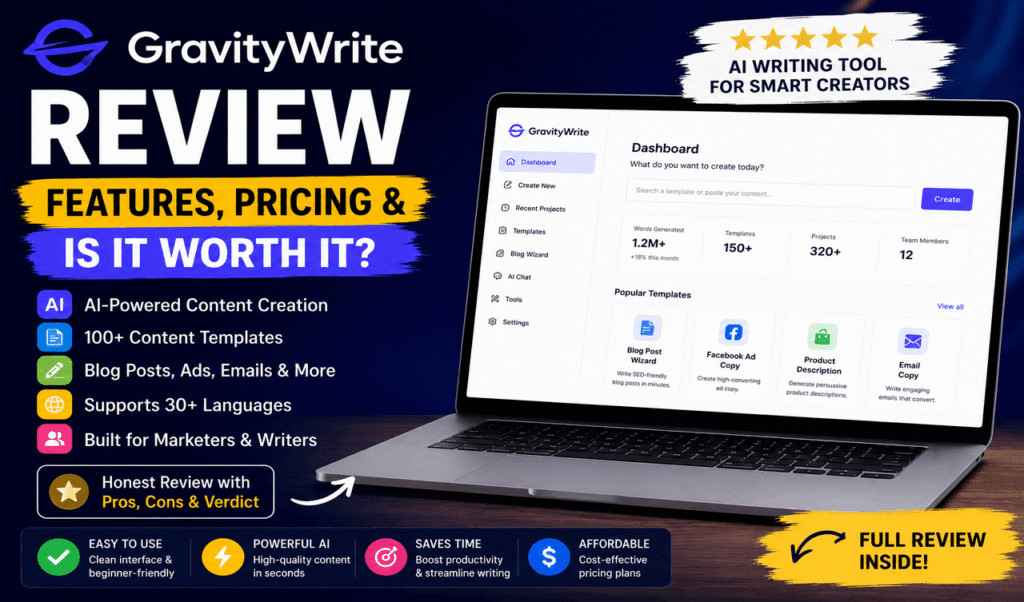
GravityWrite is a safe, versatile AI writing assistant that generates text and image prompts for marketing, blogging, and copywriting. It offers a limited free plan and paid tiers starting at $19 per month. Choose the GravityWrite platform if you need pre-built templates for fast, structured content creation, but look for alternatives if you need highly advanced editing features.
There are many ways to approach content creation today—from doing it entirely yourself to hiring freelancers to using AI writing assistants. AI writing tools help you draft articles, emails, and social media posts in minutes. That means you can spend less time staring at a blank screen and more time focusing on your overall strategy.
GravityWrite is one of these AI writing assistants. It aims to simplify the writing process by offering specific templates for different types of content. This review covers exactly what the GravityWrite platform does, who should use it, and where it falls short.
Here you will learn about its key features, pricing, and how it compares to other tools on the market. By the end of this review, you will have the facts you need to decide if the GravityWrite application belongs in your daily workflow.
What Exactly Is GravityWrite?
GravityWrite is an AI platform designed to handle the heavy lifting of writing. It isn’t just one tool. It is a massive library of over 110 specialized templates. Think of it as a digital Swiss Army knife. Need a blog post? There’s a tool for that. Need a YouTube script? There’s a tool for that, too. It uses advanced models like GPT-4 and Claude to generate text, images, and even basic videos. The goal is simple: You provide a tiny bit of info, and it gives you a finished product in seconds. It is built by the folks at Website Learners, so they know exactly what modern creators need.
What are the key features of the GravityWrite AI assistant?
GravityWrite is designed for marketers, bloggers, and business owners who need to produce a high volume of content quickly. However, relying entirely on AI generation carries the risk of producing generic text. The GravityWrite platform mitigates this by offering highly specific templates that guide the AI to better outputs. That translates into usable content that requires fewer revisions.
Content generation across formats
GravityWrite supports dozens of different content types. You can generate blog posts, social media captions, ad copy, and email newsletters. When you select a template, the tool asks for basic inputs—such as your topic and target audience—and generates a draft based on those parameters.
Grammar checking and text refinement
Beyond generating new text, the GravityWrite platform includes basic editing tools. It can check your grammar and rewrite sentences for clarity. While it may not replace a dedicated grammar checker, it helps you clean up your drafts before you publish them. That provides built-in protection against embarrassing typos.
GravityWrite image prompt generation
The platform also includes a GravityWrite image prompt generator. This feature helps you write descriptive prompts for AI image generators like Midjourney or DALL-E. Creating good image prompts can be tricky. This tool gives you the exact phrasing you need to get better visual results for your content.
How easy is it to use the GravityWrite interface?
The GravityWrite platform is built for users who want a straightforward experience without a steep learning curve. The risk with any new software is that you will waste time trying to figure out how to navigate the menus. GravityWrite avoids this with a clean, template-driven dashboard.
When you log in, you see a list of categories—from website copy to YouTube scripts. You simply click the category you need, fill in the text boxes, and hit generate. The platform usually produces text within seconds. That means you can move from idea to draft almost instantly.
Currently, there is no dedicated GravityWrite app for mobile devices. You must access the GravityWrite platform through a web browser. That said, the website is responsive, so you can still use it on a phone or tablet if you are away from your desk. If mobile access is your primary need, this limitation is worth keeping in mind.
What are the main pros of using GravityWrite for content creation?
GravityWrite appeals to solo creators and small marketing teams who need to scale their output. Using AI to write all your content can sometimes make your brand voice sound robotic. But when used as a drafting tool, the benefits generally outweigh this risk.
Efficiency and speed
The biggest advantage of the GravityWrite platform is speed. You can outline an entire month of social media posts in one sitting. That frees up your schedule for other tasks.
Versatility of templates
GravityWrite offers a wide range of templates. You are not just getting a blank chat interface. You get structured forms for real estate listings, SEO meta tags, and e-commerce product descriptions. This built-in structure often leads to better initial drafts.
Quality of initial output
Because GravityWrite uses established AI models behind the scenes, the output quality is generally high. It handles basic informational and promotional writing well. You will still need to review and edit the text, but the platform gives you a solid foundation to build upon.
What are the cons and limitations of using GravityWrite?
Even the best software has limitations. For advanced writers or large enterprises, GravityWrite may lack some necessary depth. Knowing these drawbacks upfront helps you set realistic expectations.
Repetitive phrasing
Like most AI writing assistants, GravityWrite can fall into repetitive phrasing if you use it for long-form content. If you generate a 2,000-word article, you may notice the same sentence structures appearing multiple times. You will need to manually edit the text to give it a human rhythm.
Limited brand voice customization
While you can specify the tone of your content, GravityWrite does not learn your specific brand voice over time as effectively as some enterprise tools. That means you must add your company’s unique personality during the editing phase.
Browser-only access
As mentioned earlier, there is no native GravityWrite app. Users who prefer working offline or through a dedicated mobile application will find this inconvenient.
How to Write a High-Ranking Article (My Step-by-Step)
I don’t just “hit a button” and publish. That is a technique for failure. Here is how a professional uses GravityWrite to actually rank on page one.
1. Research First: I use their keyword generator to find a “low-hanging fruit” topic.
2. Generate the Outline: I let the AI build the bones. I usually delete one or two sections that feel like filler.
3. Section by Section: Instead of one giant prompt, I generate each section separately. This keeps the AI focused and prevents it from rambling.
4. Add the “Human Sauce”: This is the most important part. I add a real-life example or a joke. AI can’t tell the story about the time I accidentally deleted my first website. Only I can do that.
5. Use the Humanizer: I run the final draft through the humanizer tool to smooth out the edges.
The Good, The Bad, and The Ugly
No tool is perfect. If a reviewer tells you a tool is 100% flawless, they are probably lying to you.
The Pros
- Incredible Speed: You can honestly draft a 1,500-word post in under 15 minutes.
- Huge Template Library: From Instagram captions to legal pages, it covers almost everything.
- Affordable Entry: You can start for free, and the paid plans are very competitive.
- Beginner Friendly: You don’t need to be a prompt engineer. Just fill in the blanks.
The Cons
- Fact Checking Needed: Like all AI, it can get facts wrong. Always double-check dates and statistics.
- Occasional Repetition: Sometimes it gets obsessed with a certain word. You’ll need to do a quick scan to keep the variety up.
- Image Quality: The image generator is okay, but it won’t replace a pro designer for high-end graphics.
How much does GravityWrite cost, and is it free or paid?
Budget is often the deciding factor when choosing software. You need to know if the cost justifies the time you save. Is GravityWrite free or paid? The GravityWrite platform offers both a free plan and paid subscriptions.
How to use GravityWrite for free
GravityWrite provides a free tier that gives you a limited number of words per month. This is an excellent way to test the platform. You simply create an account on their website, and you can start using the templates immediately. However, the free plan limits your word count and restricts access to some of the more advanced templates.
Paid subscription plans
If you outgrow the free tier, you will need to upgrade. The Starter plan typically costs around $8 per month. This tier gives you a much higher word count and access to premium tools, including the GravityWrite image prompt generator.
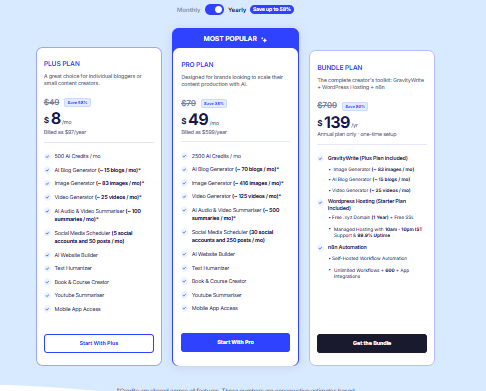
The Pro plan, designed for heavy users and small agencies, costs around $49 per month. This plan offers extended limits and prioritized support.
Is GravityWrite worth it? If you regularly spend hours writing basic copy and emails, the $8 monthly cost pays for itself in time saved. But if you only write occasionally, the free plan should be sufficient.
Should you use GravityWrite for your writing tasks?
GravityWrite is a practical, reliable AI writing assistant that excels at template-driven content creation. It simplifies the writing process for bloggers, marketers, and small business owners.
Is GravityWrite any good? According to recent data from [Trustpilot, 2024], the GravityWrite review scores generally sit above 4.5 out of 5 stars. Users consistently praise its ease of use and the variety of templates available.
Is GravityWrite safe? Yes, GravityWrite is safe to use. It uses standard encryption to protect your account data. That said, as with any AI tool, you should avoid entering sensitive personal information, passwords, or confidential company secrets into the prompt boxes.
If you need a tool to help you break through writer’s block and scale your content production, the GravityWrite platform is a solid choice. Start with the free plan to see if the templates match your workflow, and upgrade only when you need more words.
GravityWrite vs. ChatGPT: Why Not Just Use the Free Bot?
I get this question a lot. “Why should I pay for this when ChatGPT is free?”
The answer is workflow. ChatGPT is a blank box. You have to tell it exactly what to do, how to format it, and what to avoid. GravityWrite has already done that work for you. The templates are tuned for specific results.
It’s the difference between buying all the ingredients and cooking from scratch versus having a world-class chef prep everything for you. GravityWrite saves you from “prompt fatigue.”
Can You Actually Rank with This?
Yes. I have several sites that use a mix of AI and human editing. The secret is value. Google likes content that answers the user’s question quickly. GravityWrite is excellent at structuring information in a way that is easy to read. When you combine its SEO intelligence with your own expertise, you get a “super-article.” It is long, detailed, and hits all the right keywords without feeling like spam.
Common Myths About GravityWrite
Myth 1: It will get my site banned.
False. Helpful content is helpful content. If you use the tool to help people, Google will reward you.
Myth 2: It’s only for English.
False. It supports over 70 languages. This is a game-changer if you want to enter foreign markets without hiring a translation team.
Myth 3: It writes perfectly on the first try.
False. You still need to be the editor. Treat it like a very talented intern, not a replacement for your brain.
How does GravityWrite compare to other AI writing tools?
The market for AI writing tools is crowded. From simple chat interfaces to full-scale marketing platforms, there is an option for every workflow. Choosing the right one depends on your specific needs and budget.
When looking for a GravityWrite alternative, people often consider tools like Jasper, Copy.ai, or ChatGPT.
Jasper and Copy.ai are built for larger marketing teams. They offer advanced brand voice training and team collaboration features. However, they are typically more expensive than GravityWrite. Choose Jasper if you manage a large team and need strict brand consistency. Choose GravityWrite if you are a solo user who just needs reliable templates at a lower cost.
ChatGPT is a general-purpose AI. It is highly flexible but requires you to write your own prompts from scratch. GravityWrite provides the templates for you. That saves you the trouble of figuring out how to instruct the AI.
Some users also ask: Is HyperWrite better than ChatGPT? HyperWrite focuses heavily on predictive typing and browser integration, helping you write emails and documents faster as you type. ChatGPT acts more like a conversational assistant. Choose HyperWrite if you want AI to finish your sentences while you work. Choose ChatGPT if you want a back-and-forth conversational partner. GravityWrite sits in a different category entirely, acting as a template-driven content generator.
What are the best use cases for GravityWrite?
GravityWrite works best when you need structured, short-to-medium-length content. Here are a few practical ways to integrate the GravityWrite platform into your routine.
Drafting blog outlines and introductions
Staring at a blank page is the hardest part of writing. You can use GravityWrite to generate a comprehensive outline and an introductory paragraph. Once the structure is in place, you can manually fill in the details with your own expertise.
Generating social media calendars
Social media requires constant updating. You can use GravityWrite to generate thirty days of Facebook or LinkedIn posts based on a single core topic. That gives you a month of content in just a few clicks.
Creating product descriptions
If you run an e-commerce store, writing descriptions for hundreds of products is tedious. GravityWrite has templates specifically for this. You input the product features, and it generates an appealing description designed to sell.
Frequently Asked Questions
Is GravityWrite safe to use for business content?
Yes, GravityWrite is safe for general business use. The platform uses standard security measures to protect your account. However, you should never input sensitive customer data or confidential trade secrets into any AI writing assistant, as that data is processed on external servers.
How do I access the GravityWrite app?
Currently, there is no standalone GravityWrite app for iOS or Android. You must access the GravityWrite platform through a web browser on your computer, tablet, or smartphone. The website is mobile-responsive.
Is HyperWrite better than ChatGPT?
HyperWrite and ChatGPT serve different purposes. Choose HyperWrite if you want a predictive typing assistant that integrates directly into your browser to help you write emails and documents faster. Choose ChatGPT if you want a conversational AI to brainstorm ideas, write code, or answer complex questions.
What is the best GravityWrite alternative?
The best GravityWrite alternative depends on your needs. Choose Jasper or Copy.ai if you need advanced brand voice training and team collaboration features. Choose ChatGPT or Claude if you prefer a flexible, prompt-based chat interface instead of pre-built templates.
Final Verdict: Should You Buy It?
If you are a solo creator, a small business owner, or an affiliate marketer, GravityWrite is a no-brainer. It removes the friction from the writing process. It lets you focus on strategy while it handles the typing. For the price of a few lunches, you get a tool that can produce a month’s worth of content in a weekend.
My Final Score: 4.5/5. It loses half a point only because the image generator could be a bit sharper. But for text? It’s a powerhouse.