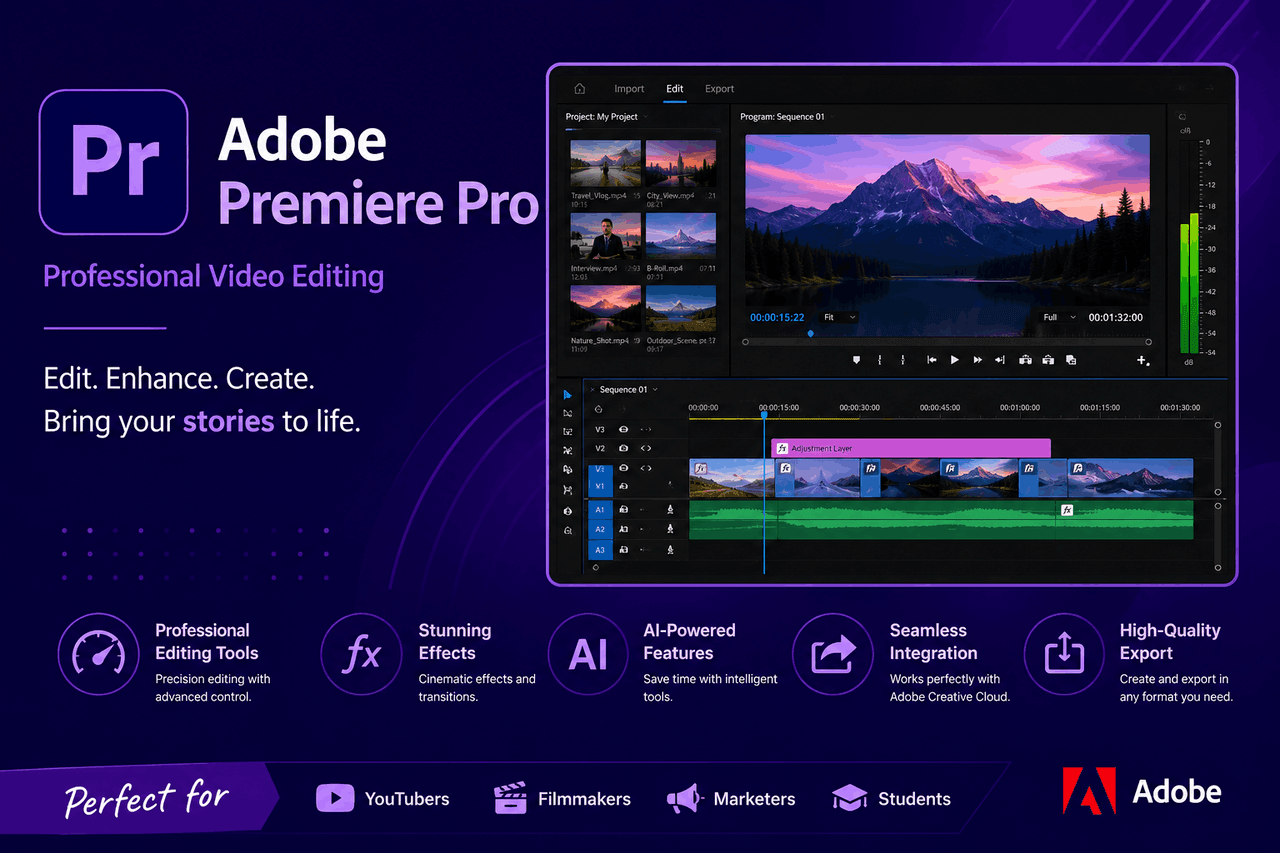
Adobe Premiere Pro is a professional-grade video editing application. It offers advanced timeline editing, precise color grading, and direct integration with Adobe Creative Cloud. Choose Premiere Pro if you need industry-standard tools for complex projects, but consider simpler alternatives if you are a beginner on a strict budget.
There are many ways to edit video — from basic free apps on your phone to intermediate desktop software to highly advanced studio tools. That means you can find a video editor that fits your exact skill level and project requirements. Adobe Premiere Pro sits firmly at the top end of that spectrum.
If you want to edit video for a living, start a YouTube channel with high production values, or cut an independent feature film, you need software that can handle heavy workloads without crashing. You also need tools that give you total control over your final export. Adobe Premiere Pro is an industry-standard video editing application used by professionals worldwide. It provides a massive suite of features, but that power comes with a significant learning curve.
This guide explores the benefits, core features, and pricing of Adobe Premiere Pro. We will look at what it does well and where it falls short, giving you a clear picture of whether this video editing application is the right fit for your creative projects.
Who is Adobe Premiere Pro for?
Adobe Premiere Pro targets video professionals, YouTubers, and filmmakers who need a comprehensive set of editing tools. From solo creators making daily vlogs to massive post-production houses cutting Hollywood films, there is a configuration for almost every high-level need.
The software is best suited for people with some background in video editing. If you are entirely new to cutting video, you might find the interface overwhelming. But taking the time to learn this system rewards you with total creative control.
What are the key benefits of using Premiere Pro?
Professional video editors choose Premiere Pro because it solves complex problems efficiently. Here are the main benefits you get when you use this video editing application.
Professional-grade editing tools
Adobe Premiere Pro gives you precise control over every frame of your video. You can trim clips, adjust timing, and layer multiple video tracks with ease. The application usually responds quickly to your commands, allowing you to work at the speed of your thoughts. That built-in efficiency helps you finish complex edits faster.
Direct integration with Adobe Creative Cloud
Premiere Pro connects directly with other Adobe applications. You can send a complex audio track to Adobe Audition for cleanup, or import a motion graphics template from Adobe After Effects without rendering the file first. This interconnected ecosystem saves you hours of export time. But that ecosystem requires you to stay within the Adobe family of products.
Extensive format support and customization
You can drop almost any video file format into a Premiere Pro timeline. From standard MP4 files to high-resolution RED camera footage, the software reads the files natively. You do not need to spend time converting files before you start editing. You can also customize your workspace panels to fit exactly how you like to work.
What core features and functionality does Premiere Pro offer?
Adobe continually updates Premiere Pro with new tools. These core features form the foundation of the video editing application.
Non-linear editing capabilities
Premiere Pro uses a non-linear editing system. This means you can place video clips anywhere on the timeline and edit them out of order. You can stack multiple layers of video, text, and graphics. This approach gives you total freedom to experiment with the pacing and structure of your video.
Advanced audio editing and mixing
A good video requires great audio. Premiere Pro includes a comprehensive audio track mixer. You can apply effects to remove background noise, compress vocal tracks to make them sound consistent, and mix your audio to surround sound formats. The Essential Sound panel simplifies these tasks, letting you assign audio types like “Dialogue” or “Music” and adjust them with simple sliders.
Color correction and grading
The Lumetri Color panel gives you professional color-grading tools right inside your editing window. You can fix white balance issues, match colors between different cameras, and apply creative looks to your footage. The software includes predefined scopes and waveforms, so you can measure your colors accurately rather than relying on your eyes.
Motion graphics and visual effects
You can build basic animations and titles directly inside Premiere Pro using the Essential Graphics panel. If you need more complex visual effects, the software links directly to Adobe After Effects. You can create a complex graphic in After Effects, save it as a template, and then just change the text inside Premiere Pro. That is a massive time-saver for repetitive graphics, such as lower-thirds.
Multi-cam editing
When you shoot an interview or a live event with three or four cameras at once, editing that footage can take days. Premiere Pro includes a multicam editing feature that automatically syncs all your camera angles using their audio tracks. Once synced, you can play the timeline and click on the different angles to switch between them in real time, much like a live television director.
VR video editing
As virtual reality grows, editors need tools to handle 360-degree video. Premiere Pro supports VR video editing natively. You can view the footage in VR while editing, and the software includes effects that wrap properly around spherical video without creating visible seams.
How does Premiere Pro perform and manage workflow?
A video editing application is only as good as its reliability. Here is how Premiere Pro handles system resources and project organization.
System requirements and optimization tips
Premiere Pro requires a powerful computer. You need at least an Intel 6th-generation or newer processor, 16 GB of RAM, and a dedicated graphics card with at least 4 GB of VRAM. If you want to edit 4K or 8K footage, those requirements double. You can improve performance by using proxy files. Proxies are smaller, lower-resolution copies of your video files that you edit with. When you export, Premiere Pro automatically uses the high-resolution original files.
Efficient project management
Large video projects generate thousands of individual files. Premiere Pro uses a system of digital folders called “bins” to organize everything. You can search for files using metadata, color-code your clips, and create smart bins that automatically gather files based on specific rules.
Collaboration tools
If you work on a team, Premiere Pro offers Team Projects. This feature lets multiple editors open the same project file simultaneously. You can see who is working on what sequence, and the software automatically manages version control so no one accidentally overwrites someone else’s work.
How much does Adobe Premiere Pro cost?
Adobe does not sell Premiere Pro as a one-time purchase. Instead, you pay a recurring subscription fee.
Subscription models
You can buy a single-app subscription to Premiere Pro, which currently costs $22.99 per month if you commit to an annual plan. If you need other tools like Photoshop, Illustrator, and After Effects, you can buy the Creative Cloud All Apps plan for $59.99 per month.
Student and team discounts
Adobe offers significant discounts for students and teachers. Eligible users can get the entire Creative Cloud All Apps plan for $19.99 per month for the first year. Businesses can buy Creative Cloud for Teams, which starts at $37.99 per month per license for single apps. The team’s plans include advanced admin tools to manage who gets access to the software.
Value for money
The subscription model means you never own the software, and you lose access to your project files if you stop paying. However, the subscription ensures you always have the latest version of the software with the latest features. For working professionals, the monthly cost is usually a minor business expense compared to the income the software helps generate.
What are the main pros and cons of Premiere Pro?
Every tool has strengths and weaknesses. Here is an honest look at what you get and what you give up.
Advantages
Premiere Pro is the industry standard for a reason. It handles almost any file format you throw at it, features incredibly deep color and audio tools, and integrates directly with the rest of the Adobe suite. Learning this software makes you highly employable in the video production industry.
Disadvantages
The biggest drawback is the learning curve. Premiere Pro is complex, and beginners often feel lost in the interface. Second, the software is notoriously resource-intensive. If your computer is older, the application will run slowly or crash. Finally, the mandatory monthly subscription cost frustrates users who prefer to buy their software outright.
What are the best alternatives to Adobe Premiere Pro?
If Premiere Pro doesn’t sound like the right fit, you have several excellent options.
DaVinci Resolve offers an incredibly powerful free version, and its paid “Studio” version costs a one-time fee of $295. It features the industry’s best color grading tools.
Final Cut Pro runs exclusively on Mac computers. It costs a one-time fee of $299 and offers a magnetic timeline that many beginners find much easier to learn than Premiere Pro’s traditional track system.
Avid Media Composer remains the gold standard for editing feature films and major television shows. It is highly rigid and difficult to learn, but it handles massive, multi-editor projects better than any other software on the market.
Why you should consider Adobe Premiere Pro
Adobe Premiere Pro balances immense creative power with widespread industry adoption. From basic timeline cutting to advanced color grading, it provides everything you need to deliver a professional video project.
The software demands a fast computer, a monthly budget, and a willingness to learn a complex interface. But the greater rewards come with that initial investment in time and money. If you are serious about video editing as a career or a high-level hobby, Adobe Premiere Pro is a trusted tool that will grow with your skills.
Frequently asked questions
Can I buy Adobe Premiere Pro without a subscription?
No. Adobe only offers Premiere Pro through a monthly or annual subscription via the Creative Cloud. If you want a video editing application with a one-time purchase price, consider alternatives like Final Cut Pro or DaVinci Resolve Studio.
How long does it take to learn Adobe Premiere Pro?
If you have never edited video before, expect to spend 20 to 30 hours learning the basic interface, timeline functions, and export settings. Mastering advanced features like Lumetri Color and audio mixing often takes several months of consistent practice.
Is Adobe Premiere Pro better than DaVinci Resolve?
Choose Premiere Pro if you rely heavily on other Adobe apps like After Effects and Photoshop, or if you need to collaborate with standard industry production houses. Choose DaVinci Resolve if you want top-tier color grading tools, a one-time purchase model, or a highly capable free version.
Will Premiere Pro run on a basic laptop?
Premiere Pro requires significant computing power. While it may open on a basic laptop, playback will likely stutter, and export times will be frustratingly slow. You need a machine with a dedicated graphics card and at least 16 GB of RAM for a functional editing experience.