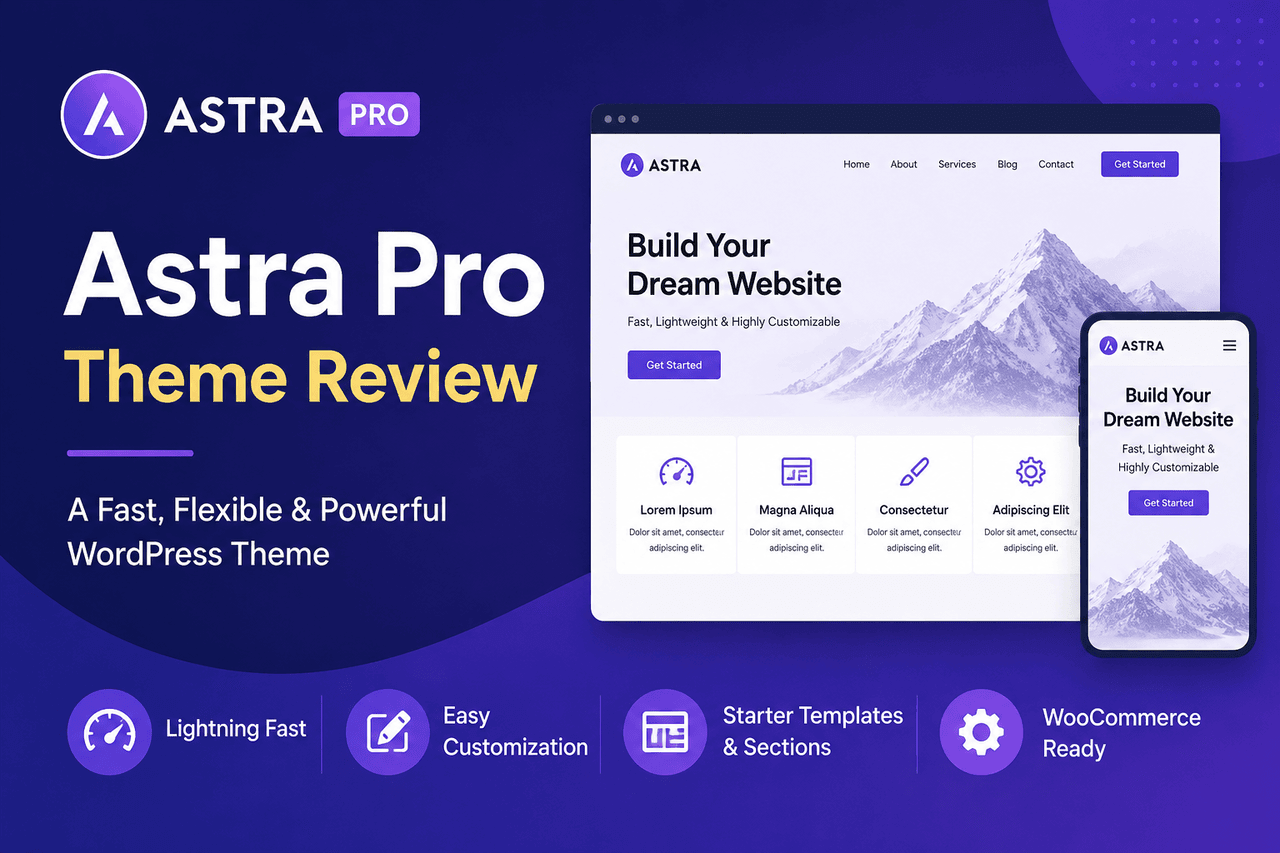
The Astra Pro WordPress theme is a lightweight, highly customizable add-on that upgrades the free Astra theme. It is best for users who want fast loading speeds, deep integration with page builders like Elementor, and access to over 240 pre-built website templates. Choose Astra Pro if website performance and design flexibility matter more than having an all-in-one, highly opinionated design out of the box.
Building a WordPress website is a lot like constructing a house. Your hosting is the plot of land, WordPress is the foundation, and your theme is the architectural framework. Pick a heavy, complicated framework, and your site will be slow to load and difficult to change. Pick a lightweight, flexible framework, and you can build almost anything you want.
The Astra Pro WordPress theme serves as that lightweight framework. It is technically a plugin that extends the functionality of the free Astra theme, adding advanced styling, custom layouts, and premium integrations.
With over one million active installs, Astra has become a default choice for many web developers and casual users alike. But popularity does not always equal suitability. This review breaks down exactly what Astra Pro does, how it performs, and whether it makes sense for your specific website project.
What are the key features of the Astra Pro WordPress theme?
Astra Pro acts as a modular toolkit. Instead of forcing you to load every feature at once, it allows you to turn on only the tools you need. This keeps your WordPress dashboard clean and your website fast.
Overview
The core of Astra Pro is its modular architecture. It unlocks advanced modules for typography, colors, blog layouts, and navigation menus. You also get deep integrations with e-commerce platforms like WooCommerce and learning management systems like LearnDash.
Who is this for?
Astra Pro is built for users who want granular control over their website’s design without writing code. It is an excellent choice for a freelance web designer building client sites, or a small business owner who wants a professional online store that does not look like a generic template.
Rewards
You get access to a massive library of design options. The Site Layouts module lets you choose between boxed, full-width, or padded layouts. The Sticky Header and Mega Menu modules allow you to build complex, professional navigation structures usually reserved for enterprise websites.
Risks
Having so many options can lead to decision fatigue. If you are a beginner who just wants a site to look perfect immediately upon activation, the sheer number of toggle switches and color pickers in the WordPress Customizer might feel overwhelming.
How does Astra Pro impact website performance and speed?
In the world of website themes, Astra is a minimalist. It strips away the unnecessary code that drags down page load times.
Overview
The free Astra theme requires less than 50 kilobytes of resources and loads in under half a second on default WordPress installations. Astra Pro maintains this performance by using vanilla JavaScript instead of jQuery, which is a heavier script library that many older themes rely on.
Who is this for?
Fast load times are critical for anyone who relies on search engine traffic or runs an e-commerce store. If your site takes longer than three seconds to load, you risk losing as much as 40% of your visitors. Astra Pro is for the user who refuses to sacrifice speed for design.
Rewards
By keeping the codebase light, Astra Pro helps you score higher on performance testing tools like Google PageSpeed Insights. Better performance scores often translate to better search engine rankings and lower bounce rates. You give your visitors a smooth, frictionless browsing experience.
Risks
Because Astra is so lightweight, it does not include heavy, built-in design elements like complex sliders or proprietary page builders. If you want those features, you will need to install separate third-party plugins, which can eventually bloat your site if you are not careful with your choices.
What customization capabilities does Astra Pro offer?
Astra Pro moves design control out of the code editor and into the visual WordPress Customizer. You see your changes happen in real time.
Overview
The premium add-on unlocks the advanced Header and Footer Builder. You can drag and drop elements like buttons, HTML widgets, and social icons directly into your navigation areas. It also provides global typography and color controls, meaning you can change the font of every heading on your site with a single click.
Who is this for?
This level of customization is ideal for marketers and brand managers. If you have strict brand guidelines that dictate specific hex codes and font families, Astra Pro gives you the exact inputs needed to match your brand identity perfectly.
Rewards
You gain total control over your website’s spacing, colors, and typography. The Custom Layouts module is particularly powerful. It allows you to inject custom code or design blocks into specific areas of your site, such as adding a promotional banner exclusively inside blog posts related to a specific category.
Risks
You can easily design a bad-looking website. Because Astra Pro gives you the freedom to change every margin and font size, you carry the responsibility of maintaining good design principles. The theme will not stop you from using five different fonts and clashing colors.
How do Astra starter sites and demos accelerate development?
Staring at a blank screen is the hardest part of building a website. Astra solves this with its library of pre-built starter templates.
Overview
When you use the Astra Pro WordPress theme, you gain access to Premium Starter Templates. This is a library of over 240 complete websites designed for various industries, including restaurants, law firms, and online stores. You import a template with one click, and it populates your site with placeholder images, text, and layouts.
Who is this for?
Starter templates are a lifesaver for business owners on a tight timeline. If you need a functional, professional-looking website launched by the end of the weekend, importing a pre-built site gives you a massive head start.
Rewards
You save dozens of hours of design work. Instead of building pages from scratch, you simply swap out the placeholder text with your own copy and replace the stock photos with your own images. The templates are professionally designed, ensuring your site looks modern and functions well on mobile devices.
Risks
Your site might look like someone else’s. Because these templates are available to hundreds of thousands of users, there is a chance another business in your industry is using the same design. You must put in the effort to customize the colors and imagery to make the template uniquely yours.
Which page builders and plugins integrate with Astra Pro?
A theme cannot do everything on its own. It needs to play nicely with the software that actually constructs your page layouts and handles your business logic.
Overview
The Astra Pro WordPress theme is explicitly built to integrate with major page builders like Elementor, Beaver Builder, and the native WordPress block editor (Gutenberg/Spectra). It also features deep, code-level integrations with WooCommerce for online stores, LearnDash for online courses, and LifterLMS.
Who is this for?
This compatibility is essential for users building complex, functional websites. If you are setting up an online storefront or a membership community, you need a theme that supports those specific plugins without breaking their layouts.
Rewards
The integration with WooCommerce, for example, gives you specialized options to customize your product galleries, checkout pages, and shopping cart icons. The page builder integrations mean that Astra gets out of the way, allowing you to design full-width, edge-to-edge web pages without the theme’s default margins getting in the way.
Risks
Relying heavily on third-party page builders can increase your ongoing costs. While Astra Pro integrates beautifully with Elementor Pro, you still have to pay for an Elementor Pro license separately. Managing multiple premium plugin licenses requires a larger budget and more administrative upkeep.
How much does Astra Pro cost, and is it a good value?
Software pricing can be confusing, but Astra keeps its tiers relatively straightforward based on how many sites you need to build and what extra tools you want.
Overview
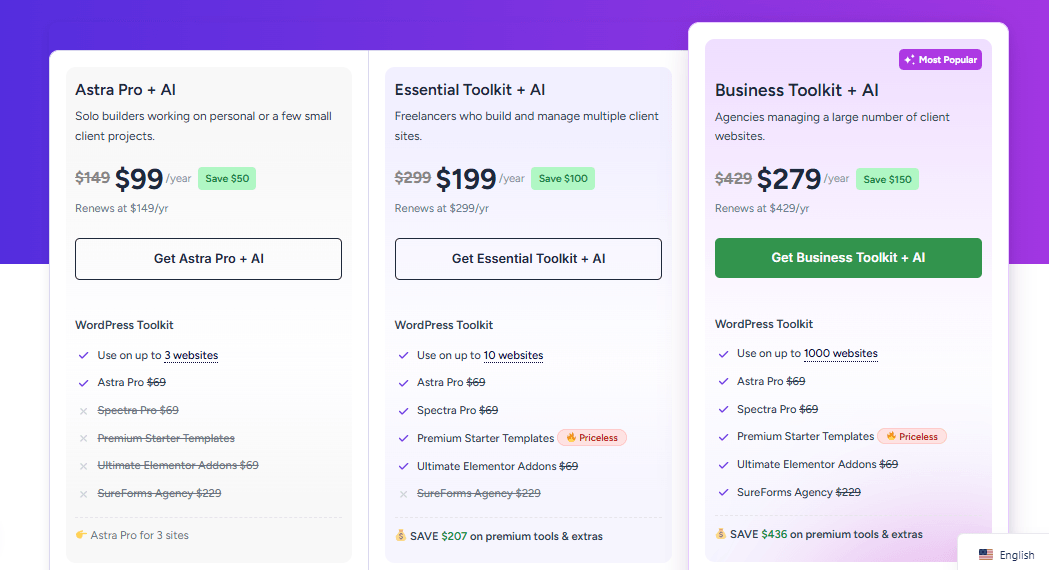
The Astra Pro WordPress theme usually costs around $99 per year for the base Pro version. They also offer higher-tier bundles, typically priced around $199 to $279 per year, which include the Premium Starter Templates and other plugins like Spectra Pro. Lifetime licenses are available for all tiers, allowing you to pay once and receive updates forever.
Who is this for?
The $99 base tier is great for a single business owner or a blogger. The higher-tier bundles and lifetime licenses make the most sense for web design agencies that plan to build dozens of client websites using Astra as their foundational framework.
Rewards
You can use a single Astra Pro license on an unlimited number of websites. This makes the $99 annual cost incredibly efficient if you run a portfolio of blogs or build sites for a living. The value scales upward with every new site you launch.
Risks
The base $99 tier does not include the Premium Starter Templates. If you buy the entry-level package expecting access to all 240+ pre-built sites, you will be disappointed to find that many of them are locked behind the higher-priced Essential Toolkit or Business Toolkit bundles.
What are the main pros and cons of using Astra Pro?
Every software tool requires compromises. Here is a plain look at the trade-offs you make when choosing this theme.
Pros of the Astra Pro WordPress theme:
- Fast load times that help improve search engine rankings.
- Unlimited website usage on a single premium license.
- Deep integration with major page builders like Elementor and Beaver Builder.
- Advanced WooCommerce controls for e-commerce stores.
- Modular design keeps the WordPress dashboard clean and uncluttered.
Cons of the Astra Pro WordPress theme:
- Premium Starter Templates require a more expensive bundle upgrade.
- The sheer volume of Customizer settings can overwhelm complete beginners.
- Heavily reliant on third-party page builders for complex page layouts.
Should you buy the Astra Pro WordPress theme?
The Astra Pro WordPress theme is a highly capable, fast, and flexible tool. It gives you the architectural framework to build almost any type of website without writing a single line of code.
Choose Astra Pro if you prioritize website speed, if you already use a visual page builder like Elementor, or if you plan to build multiple websites and want to use the same reliable theme for all of them. It is an investment that pays off in time saved and frustration avoided.
Do not choose Astra Pro if you are looking for an all-in-one, highly specific niche theme (like a theme built exclusively for podcasting) that includes all the functionality natively. Astra is a versatile foundation, not a pre-furnished house.
If you are ready to take control of your website’s design and speed, starting with the base $59 Astra Pro license is a sensible, low-risk step forward.
FAQs about the Astra Pro WordPress theme
Is the free version of Astra enough for my website?
The free version of Astra is sufficient for very basic blogs and simple brochure websites. However, if you want to customize your header design, change typography across the site, or build an online store, you will need the features included in the Astra Pro WordPress theme.
Does Astra Pro include a page builder?
No. Astra Pro is a theme, not a page builder. It controls the global styling, headers, footers, and layout structure of your site. To build complex inner-page layouts, you will need to use the native WordPress block editor or install a separate page builder plugin like Elementor.
Will Astra Pro slow down my WordPress website?
No. Astra Pro is built specifically for speed, using less than 50 kilobytes of resources. Because it is modular, you only activate the features you actually use, ensuring no unnecessary code is loaded onto your pages.
Do I have to pay every year to use Astra Pro?
You can continue using the Astra Pro WordPress theme even if your annual subscription expires. However, you will no longer receive security updates, bug fixes, or premium customer support. To avoid annual fees, you can purchase a lifetime license instead.
Can I use Astra Pro on client websites?
Yes. Every Astra Pro license allows for unlimited website usage. This means you can install the theme on your own sites as well as on any websites you build and manage for your clients, making it highly cost-effective for freelance developers.