The best photo printer depends on your needs. For professional-quality prints, dye-sublimation and pigment inkjet printers deliver the richest detail and longest-lasting results. Casual users do well with affordable all-in-one inkjets, while travellers and event-goers love compact ZINK or dye-sub portable printers that fit in a bag.
Printing your own photos gives you control that a drugstore kiosk can’t match. You choose the paper, the colours, and the moment. That means no more waiting in line or settling for prints that don’t look like the shot you remember.
But picking the right photo printer isn’t simple. The market spans tiny pocket printers to large-format machines built for studios, and each type makes different trade-offs in quality, speed, and cost. Get the wrong one, and you’ll either overpay for features you don’t need or end up frustrated by prints that fall short.
This guide breaks down the main types of photo printers, the features that actually matter, and the best options for different needs and budgets. By the end, you’ll know exactly which printer fits the way you shoot and how often you print.
What are the main types of photo printers?
Photo printers fall into three main categories, each using a different technology to put colour on paper. Understanding how they work helps you match the printer to your goals.
Inkjet photo printers
Inkjet printers spray microscopic droplets of liquid ink onto paper. That means they handle a wide colour range and fine gradients well, which makes them the go-to choice for detailed photo work.
Who it’s for: Photographers and home users who want versatility. Inkjets print on many paper types and sizes, from glossy 4×6 snapshots to matte fine-art sheets.
The trade-offs: Ink can get expensive, especially if you print rarely, and cartridges dry out. Some models use six, eight, or even twelve separate inks to widen the colour range, which raises both quality and cost.
The rewards: Top inkjets, particularly those using pigment-based inks, produce archival prints that resist fading for decades. For sheer detail and colour accuracy, a good inkjet is hard to beat.
Dye-sublimation photo printers
Dye-sublimation (or dye-sub) printers use heat to transfer dye from a ribbon directly onto paper. The result is smooth, continuous tones with no visible dots.
Who it’s for: Event photographers, photo booth operators, and anyone who wants consistent, ready-to-handle prints. Dye-sub prints come out dry and often include a protective coating.
The trade-offs: Dye-sub printers usually lock you into fixed print sizes per model, and you buy ribbons and paper together. That limits flexibility compared with inkjets.
The rewards: The prints feel professional, dry instantly, and resist smudging and moisture. For volume printing at a single size, dye-sub is fast and reliable.
ZINK (Zero Ink) photo printers
ZINK printers skip ink entirely. The paper itself contains colour crystals that activate with heat, so there are no cartridges or ribbons to replace.
Who it’s for: Casual users and travellers who want quick, small prints from a phone. Most ZINK printers are pocket-sized.
The trade-offs: Print quality doesn’t match inkjet or dye-sub, and sizes are small (usually around 2×3 inches). Colours can look less vivid.
The rewards: Portability and simplicity. You load the special paper, connect your phone, and print. That’s it—no ink to manage.
What features should you consider when buying a photo printer?
Once you know the type, a few key features separate a great printer from a frustrating one. Weigh these against how you actually print.
Print quality and resolution
Print quality is the whole point, so start here. Resolution is measured in dots per inch (DPI), and a higher number generally means finer detail. For sharp photo prints, look for at least 4800 x 1200 DPI with an inkjet printer.
But DPI isn’t everything. The number of inks matters too. Printers with more ink cartridges—say, six or more—reproduce subtle skin tones and gradients more accurately than four-ink models.
Print speed
Speed matters more for some users than others. If you print one framed photo a month, a slow printer won’t bother you. If you run an event booth, every second counts.
Dye-sub printers tend to deliver prints fast and are ready to handle. Inkjets can be slower, especially at high-quality settings, since they make multiple passes. Check the rated speed for photo-quality output, not draft mode—the difference is large.
Connectivity
Modern photo printers connect in several ways. Wi-Fi and Bluetooth let you print straight from a phone or laptop without cables. Many support apps like Apple AirPrint or Mopria for Android.
Some printers also accept SD cards or USB drives, so you can print without a computer. If you shoot on a dedicated camera, that direct option is handy.
Cost per print
The sticker price is only part of the story. The real cost shows up over time in ink, ribbons, or special paper.
Inkjet cost per print varies widely. High-yield cartridges or refillable ink tanks significantly lower it—tank-based printers can bring the cost of a print down to a few cents. Dye-sub and ZINK costs are more predictable because paper and ribbon come bundled, but they’re often higher per print. Run the math on how much you print before you buy.
What are the top photo printers right now?
The market shifts often, but a few printers consistently earn praise for quality and value. Here are standout options across categories.
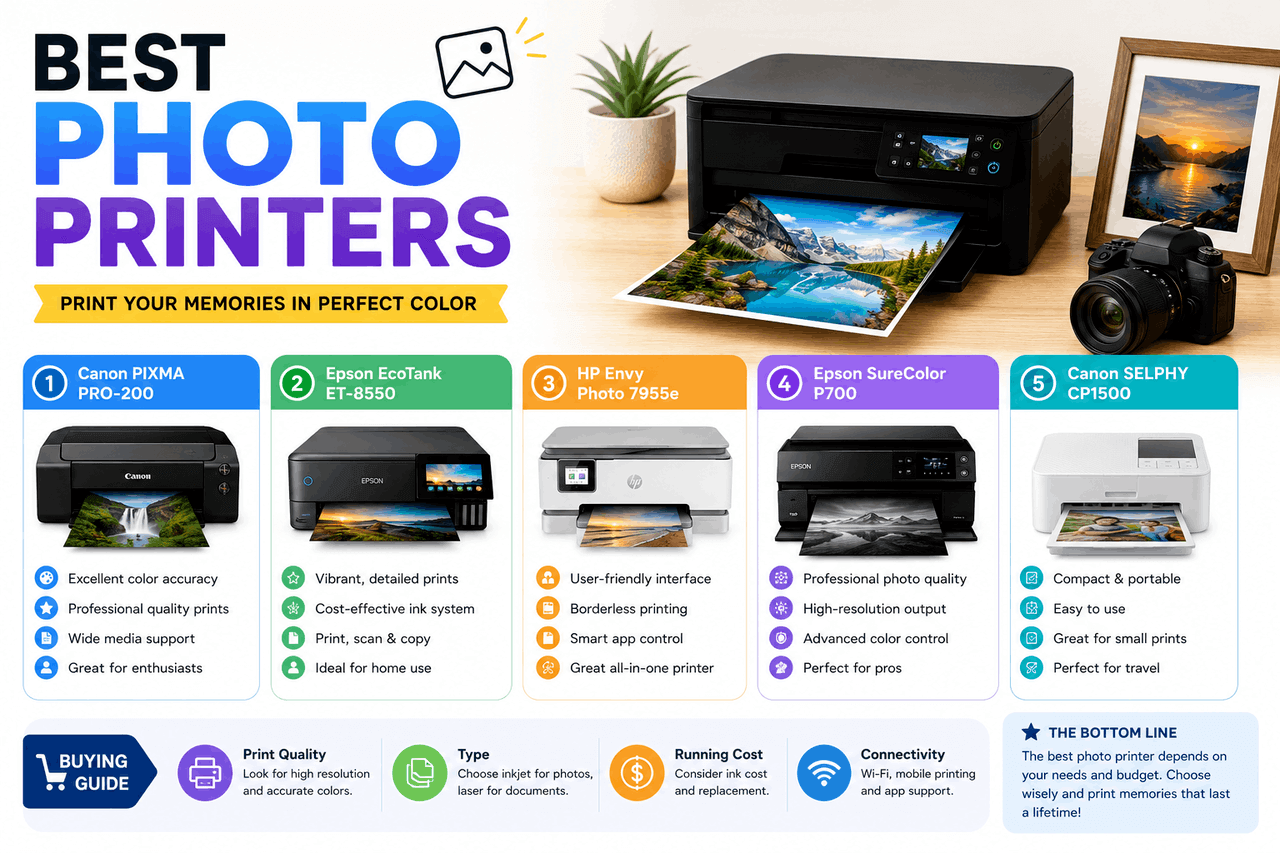
- Canon PIXMA PRO-200: A dye-based inkjet built for photographers, with eight inks and excellent colour for glossy prints up to 13 inches wide.
- Epson SureColor P700: A pigment-ink printer with ten inks that produces archival, fade-resistant prints, ideal for fine-art work.
- Canon SELPHY CP1500: A compact dye-sub printer that turns out durable 4×6 prints quickly, great for events and home use.
- Epson EcoTank ET-8550: A tank-based inkjet with very low cost per print, suited to high-volume home printing up to 13 inches wide.
- HP Sprocket: A pocket-sized ZINK printer for quick 2×3 prints from your phone.
Treat this as a starting point. Prices and availability change, so compare current reviews before you buy.
What is the best photo printer for your specific needs?
The “best” printer depends entirely on how you print. Here’s how the categories sort out by user.
Best photo printer for professionals
Professionals need accurate colour and prints that last. That points to large-format pigment inkjets with many inks, such as the Epson SureColor P700 or Canon imagePROGRAF line.
The trade-off is cost—both for the printer and the ink set. But for selling prints or building a portfolio, archival quality and colour accuracy are worth the investment. Choose a pigment-ink model if longevity matters more than upfront price.
Best photo printer for casual users
If you print family photos now and then, you don’t need a studio machine. An affordable all-in-one inkjet or a tank-based model like the Epson EcoTank covers snapshots and documents alike.
The risk with occasional printing is that the ink may dry out. Tank-based printers handle this better than cartridge-based models and keep cost per print low. Pick one if you want flexibility without ongoing expense.
Best photo printer for portability
Travellers and event-goers want small and simple. Compact dye-sub printers like the Canon SELPHY or ZINK printers like the HP Sprocket fit in a bag and print from your phone.
The trade-off is print size and, with ZINK, some quality. But for sharing physical photos on the spot, portability wins. Choose dye-sub if you want better quality at 4×6, or ZINK if pocket size matters most.
How do you choose the right photo paper?
The printer is only half the equation. Paper shapes the final look as much as the ink, so match it to your printer and your intent.
Start with the finish. Glossy paper makes colours pop and suits vivid shots, but it shows fingerprints. Matte paper reduces glare and gives a softer, more refined look, making it well-suited for portraits and art prints. Lustre and satin finishes split the difference.
Next, check weight and compatibility. Heavier paper (measured in gsm) feels more premium and resists curling. Use paper rated for your printer type—dye-sub and ZINK require their specific media, while inkjets work best with paper matched to your ink type (dye or pigment). Using the right paper isn’t a small detail; it’s the difference between a print that lasts and one that fades.
How do you maintain your photo printer?
A little upkeep keeps prints looking sharp and saves money over time. The steps are simple, but skipping them causes most printing problems.
For inkjet printers, the biggest enemy is clogged nozzles from dried ink. Print something at least once or twice a month to keep ink flowing. Run the printer’s built-in cleaning cycle when colours look off, but don’t overdo it—cleaning uses ink.
Keep the printer in a stable environment. Dust, heat, and humidity all affect performance and paper. Store paper flat in a sealed bag to prevent moisture absorption. For dye-sub and ZINK printers, handle the consumables carefully and load them as directed, since misalignment wastes paper. These small habits add up to better prints and a longer printer life.
Getting the most from your photo printing
The best photo printer is the one that fits how you shoot, how often you print, and what you print for. A professional selling fine-art prints needs a different machine than a parent printing birthday photos or a traveller sharing snapshots on the road.
Start by naming your priority—quality, cost, speed, or portability—then match it to the right printer type. From pigment inkjets for archival work to ZINK printers for pocket-sized fun, there’s an option for every need and budget. Pair it with the right paper and a little routine maintenance, and you’ll get prints worth framing for years.
Ready to choose? Compare current models in your priority category, check recent reviews for real-world results, and buy the paper made for your printer. Your photos deserve to leave the screen.
Frequently asked questions
Are inkjet or dye-sublimation printers better for photos?
It depends on your goal. Inkjet printers, especially pigment models, offer the best detail, colour range, and archival life, which suit photographers and fine-art prints. Dye-sublimation printers produce fast, smudge-resistant prints in fixed sizes, which are ideal for events and high-volume snapshots. Choose inkjet for versatility and longevity; choose dye-sub for speed and durability at one size.
How much does it cost to print photos at home?
Cost varies by printer type. Tank-based inkjets can print a photo for just a few cents, while cartridge inkjets cost more per print. Dye-sub and ZINK costs are bundled into paper-and-ribbon kits, often landing between 20 and 50 cents per 4×6 print. Factor in the printer price plus ongoing supplies to find your true cost.
Do photo prints from home printers last a long time?
They can, with the right setup. Pigment-based inkjet prints on quality paper can resist fading for 50 years or more when stored properly. Dye-based prints last well, too, but typically fade sooner. Keep prints out of direct sunlight and away from humidity to extend their life.
What’s the best portable photo printer for phones?
For pocket-sized convenience, ZINK printers like the HP Sprocket print 2×3 photos straight from your phone with no ink. For better quality, compact dye-sub printers like the Canon SELPHY CP1500 produce durable 4×6 prints and still fit in a bag. Pick ZINK for size, dye-sub for quality.
Do I need special paper for my photo printer?
Yes, in most cases. Dye-sublimation and ZINK printers require their own specific media and won’t work with regular photo paper. Inkjet printers are more flexible but print best on paper matched to your ink type—dye or pigment—and your preferred finish, whether glossy, matte, or lustre.