WP Rocket is the better choice if you want fast results with minimal setup—it’s premium, beginner-friendly, and works well out of the box. W3 Total Cache suits advanced users who want granular control and a free starting point, but it takes more time and technical know-how to configure correctly.
A slow WordPress site costs you, visitors. Pages that take more than a few seconds to load push people away, hurt your search rankings, and drag down your conversions. Caching is one of the most effective fixes—and two plugins lead the pack.
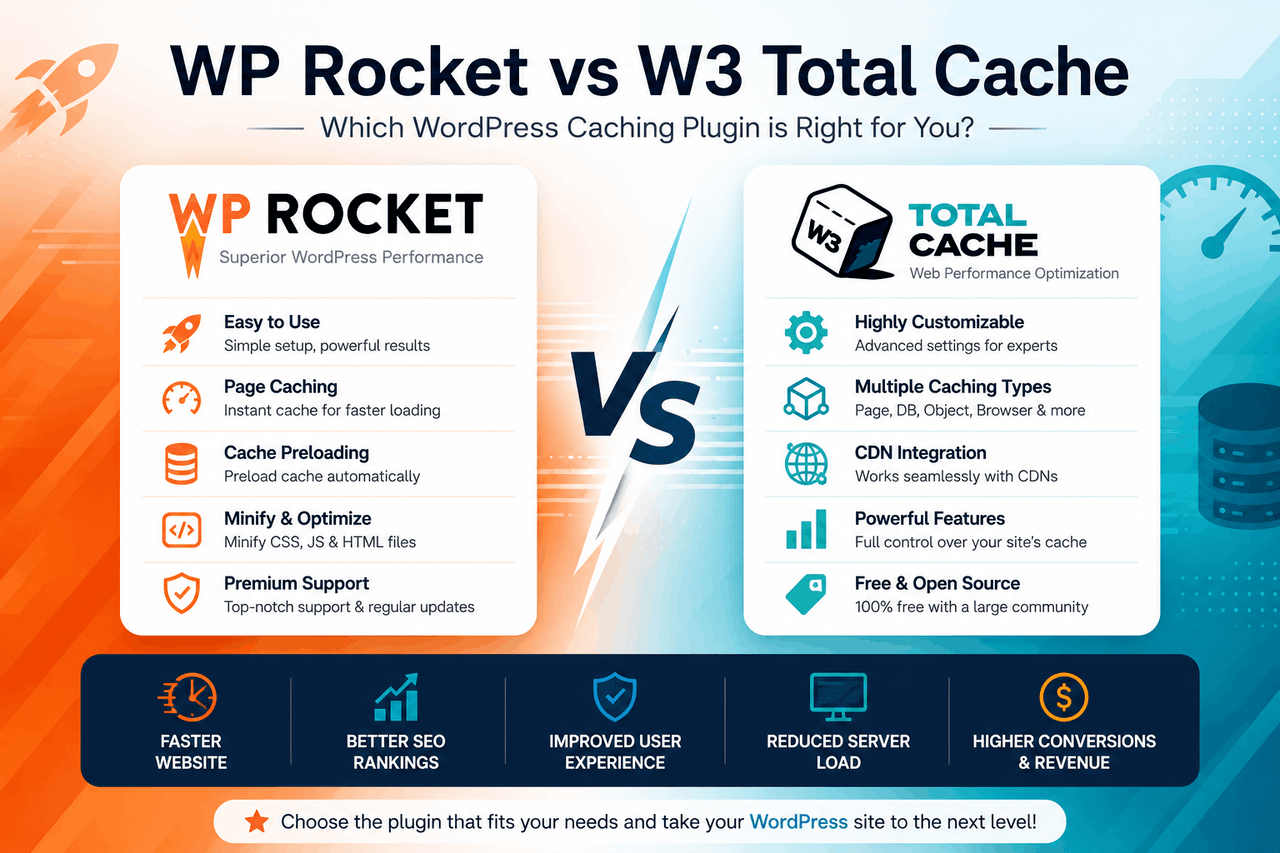
WP Rocket and W3 Total Cache both speed up your site, but they take very different approaches. One is a paid, all-in-one tool built for simplicity. The other is a free plugin packed with options for those willing to dig into the settings. The right pick depends on your skill level, your budget, and how much control you want.
This guide breaks down both plugins side by side—features, pricing, performance, and ease of use—so you can decide which one fits your site. By the end, you’ll know exactly which caching solution matches your needs.
What is WordPress caching, and why does it matter?
Caching stores a ready-made version of your web pages so they load faster. Instead of building each page from scratch every time someone visits, your server serves a saved copy. That means quicker load times and less strain on your hosting.
For WordPress, this matters more than you might think. WordPress generates pages dynamically, pulling content from a database with every request. Without caching, that process repeats for each visitor. With caching, the heavy lifting happens once. The result is faster pages, happier visitors, and better Core Web Vitals scores—a ranking factor Google uses to judge your site.
WP Rocket and W3 Total Cache are two of the most popular caching plugins for WordPress. Both can dramatically improve your load times. But they serve different kinds of users, which is exactly what this comparison will untangle.
What does WP Rocket offer?
WP Rocket is a premium caching plugin built around one idea: speed without the headache. That means you can install it, activate it, and see results almost immediately—no deep configuration required.
Features and benefits
WP Rocket turns on most of its best settings the moment you activate it. Here’s what you get:
- Page and browser caching. Saved page versions load fast, and returning visitors pull files from their own browser instead of your server.
- GZIP compression. Smaller files travel faster across the web.
- Cache preloading and sitemap preloading. WP Rocket builds your cache in advance, so visitors rarely hit an uncached page.
- LazyLoad for images and iframes. Images load only as they scroll into view, cutting initial load time.
- Minification and concatenation. WP Rocket trims and combines your CSS and JavaScript files to reduce their size.
- Database optimization. Clean out old revisions, drafts, and clutter that slow your site down.
- Google Fonts optimization. Fewer font requests mean faster rendering.
Performance impact and user experience
WP Rocket is designed for people who want results, not a project. The setup takes minutes, and the default settings already deliver strong improvements in load time and Core Web Vitals. For most site owners, that’s a major win.
That said, the simplicity comes with less granular control. If you want to fine-tune every caching rule by hand, you may find WP Rocket’s streamlined interface limiting. For most users, though, that trade-off is worth it.
Pricing and support
WP Rocket is premium only—there’s no free version. Plans start at around $59 per year for a single site, with higher tiers for multiple sites. That price includes documentation, regular updates, and access to a responsive support team. If you value fast, professional help, that support is part of what you’re paying for.

What does W3 Total Cache offer?
W3 Total Cache is a free, feature-rich caching plugin with a paid Pro tier for extra features and support. That means you can start improving your site’s speed without spending a cent—but you’ll need patience to set it up well.
Features and benefits
W3 Total Cache gives you an unusually wide range of caching methods and tools:
- Multiple caching methods. Choose from disk, OPcache, Memcached, or Redis depending on your hosting setup.
- Page, object, and database caching. Cache full pages, frequent database queries, and reusable objects for layered speed gains.
- Browser caching and GZIP compression. Standard speed boosters, both included.
- Minification. Trim your HTML, CSS, and JavaScript to shrink file sizes.
- CDN integration. Connect a content delivery network to serve your files from servers closer to your visitors.
- Fragment caching. Cache specific parts of a page rather than the whole thing—useful for dynamic content.
Configuration complexity and flexibility
W3 Total Cache hands you the keys to nearly everything. That flexibility is its biggest strength and its biggest hurdle. Advanced users can tune the plugin to match their exact hosting environment and squeeze out every bit of performance.
But the interface is dense. The settings are numerous and technical, and a wrong choice can break your site or slow it down. If you’re new to caching, expect a learning curve.
Pricing and support
The core W3 Total Cache plugin is free, which makes it appealing for tight budgets. A Pro version adds features like fragment caching enhancements and dedicated support, priced as a yearly subscription. Free users rely mostly on community forums and documentation, so help can be slower to find.

WP Rocket vs W3 Total Cache: a head-to-head comparison
Here’s how the two plugins stack up across the factors that matter most.
Which is easier to set up for beginners?
WP Rocket wins this one clearly. It works well right after activation, with sensible defaults that need little tweaking. W3 Total Cache requires you to understand caching methods, weigh options, and configure settings manually. For a beginner, WP Rocket removes nearly all the friction.
How do their performance features compare?
Both plugins cover the essentials—page caching, browser caching, GZIP, and minification. W3 Total Cache pulls ahead on raw breadth, offering object caching, fragment caching, and support for Memcached and Redis out of the box. WP Rocket focuses on the features most sites actually need and turns them on automatically. More options aren’t always better; it depends on whether you’ll use them.
Which offers more control for advanced users?
W3 Total Cache is the stronger pick for granular control. You can configure caching at multiple levels and match the plugin to advanced hosting setups. WP Rocket keeps things simpler by design, which limits how deep you can go. If hands-on tuning is your goal, W3 Total Cache gives you more room.
Which has better CDN integration?
Both plugins support CDN integration. W3 Total Cache offers broad compatibility with many CDN providers and detailed configuration options. WP Rocket integrates cleanly with major CDNs and includes its own add-on, RocketCDN, for a more streamlined experience. Choose W3 Total Cache for flexibility, WP Rocket for ease.
What about support and documentation?
WP Rocket comes with premium, dedicated support and polished documentation—part of what your subscription buys. W3 Total Cache relies largely on community forums for free users, with priority support reserved for Pro subscribers. If fast, reliable help matters to you, WP Rocket has the edge.
Which is more cost-effective?
This depends on what you value. W3 Total Cache costs nothing to start, making it the budget-friendly option. WP Rocket charges from day one but saves you time and reduces the risk of misconfiguration. Free isn’t truly free if it costs you hours of troubleshooting—so weigh your time against your dollars.
How do they perform in real-world testing?
Performance results vary by site, host, and configuration, so treat any single benchmark with caution. That said, general findings point to clear patterns.
WP Rocket tends to deliver strong speed gains immediately, thanks to its smart defaults. Many users see improvements in load time and Core Web Vitals right after activation, with little effort. That makes it reliable for people who can’t spend hours testing.
W3 Total Cache can match or even exceed WP Rocket’s performance—but usually only when configured well. With object caching through Redis or Memcached on a capable host, it can shine. Poorly configured, it may underperform or cause issues.
The website type matters too:
- Blogs and portfolios. Mostly static content. Both plugins handle these well, and WP Rocket’s defaults are often enough.
- E-commerce sites. Dynamic carts and checkouts need careful caching. W3 Total Cache’s fragment and object caching can help here, but WP Rocket also handles WooCommerce gracefully with less setup.
- High-traffic sites. Advanced caching with Redis or Memcached, available in W3 Total Cache, can make a real difference under heavy load.
Pros and cons of each plugin
WP Rocket pros and cons
Pros:
- Fast, beginner-friendly setup with strong defaults
- All key features in one tool, no add-ons required
- Premium support and clear documentation
- Reliable performance gains out of the box
Cons:
- No free version
- Less granular control for advanced tuning
W3 Total Cache pros and cons
Pros:
- Free core plugin
- Wide range of caching methods, including Redis and Memcached
- Deep configuration options for advanced users
- Broad CDN compatibility
Cons:
- Steep learning curve
- Complex interface that can break things if misconfigured
- Limited support for free users
When should you choose each plugin?
The best plugin depends on who you are and what your site needs. Here’s how to decide.
Choose WP Rocket if you want speed without the setup. It’s ideal for beginners, busy site owners, and anyone who’d rather pay for a tool that works immediately than spend hours configuring one. If your time is worth more than the subscription fee, WP Rocket is an easy call.
Choose W3 Total Cache if you’re comfortable with technical settings and want maximum control at no upfront cost. It suits developers, advanced users, and high-traffic sites that can take advantage of Redis or Memcached. If you enjoy fine-tuning and have the skills to do it safely, you’ll get a lot from the free plugin.
Your hosting environment matters too. Managed WordPress hosts sometimes include their own caching, which can overlap with these plugins—check before you stack them. And if your host supports Redis or Memcached, W3 Total Cache can put that to good use.
Final verdict on choosing your caching plugin
WP Rocket and W3 Total Cache both speed up WordPress, but they win for different reasons. WP Rocket trades money for simplicity and strong out-of-the-box results. W3 Total Cache trades your time for flexibility and a free entry point.
There is no universal “best” here—only the best fit for you. If you value ease, support, and quick wins, WP Rocket earns its price. If you value control, breadth, and a zero-cost start, W3 Total Cache rewards the effort.
Whichever you pick, pair it with quality hosting and a lean theme for the best results. Caching is powerful, but it works best as one part of a healthy, well-built site. Test your load times before and after, watch your Core Web Vitals, and adjust as you go.
Frequently asked questions
Can I use WP Rocket and W3 Total Cache together?
No. Running two caching plugins at once usually causes conflicts and can break your site. Pick one. If you want to switch, fully deactivate and remove the first plugin before installing the second.
Is WP Rocket worth paying for when W3 Total Cache is free?
It depends on your priorities. WP Rocket saves you setup time, reduces the risk of misconfiguration, and includes premium support. If your time is limited or you’re not comfortable with technical settings, that’s often worth the yearly fee. If you’re budget-conscious and technically confident, W3 Total Cache may serve you well for free.
Which plugin is better for beginners?
WP Rocket. It works well right after activation with little configuration, so beginners can improve their site speed without learning the technical details of caching.
Does W3 Total Cache slow down your site if set up incorrectly?
Yes, it can. Because W3 Total Cache offers so many options, a poor configuration can cause errors or even slow down your site. Beginners should follow a trusted setup guide or consider a simpler plugin.
Do these plugins improve Core Web Vitals?
Both can improve Core Web Vitals by reducing load times and optimizing how pages render. WP Rocket often delivers gains automatically, while W3 Total Cache can match those results when configured carefully.