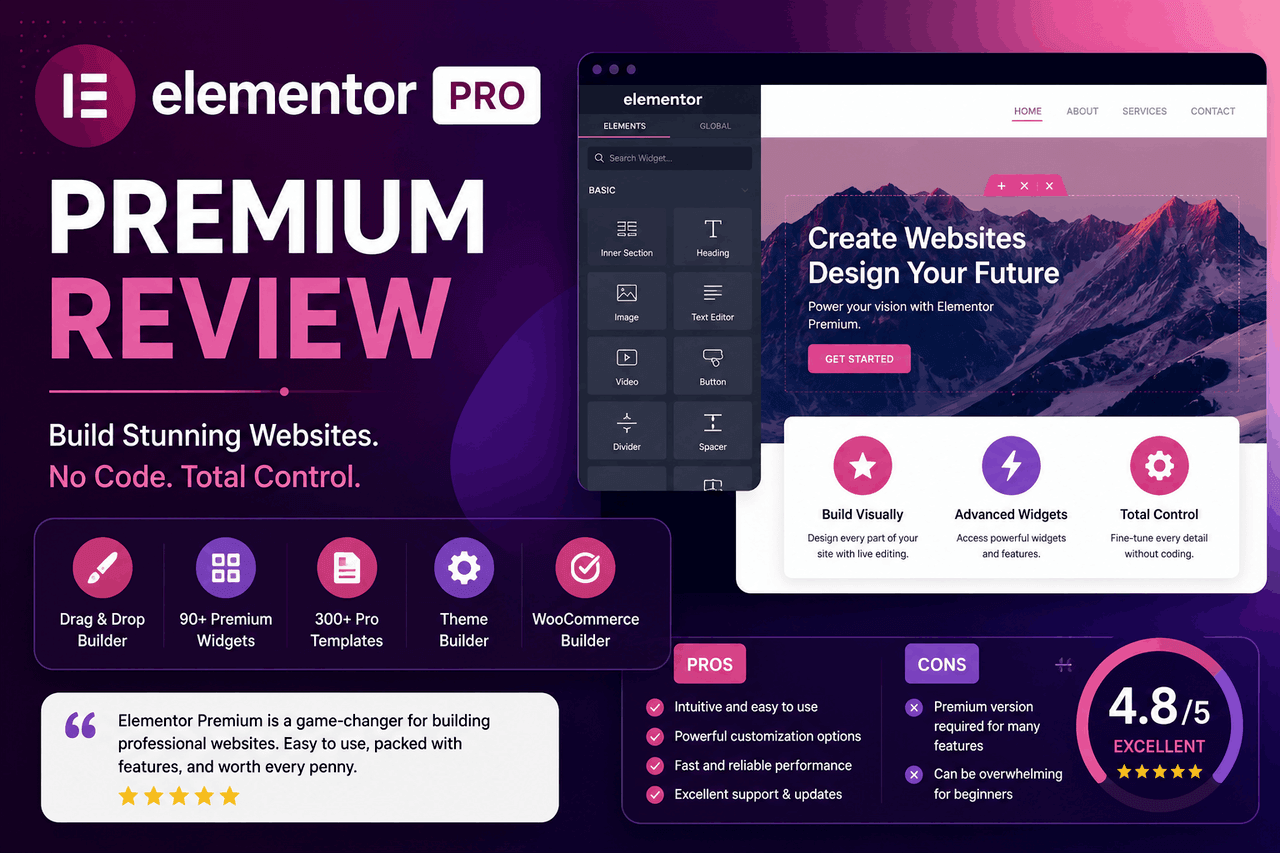
Elementor Premium (commonly known as Elementor Pro) is a paid WordPress page builder plugin that replaces the standard WordPress editor with a visual drag-and-drop interface. It costs starting at $78 per year and is best for users who need a custom Theme Builder, advanced widgets, and built-in pop-up and WooCommerce capabilities without buying extra plugins.
In the world of WordPress design, page builders are specialized power tools. They take the raw materials of a website and allow you to shape them without writing a single line of code. Elementor is currently the most popular tool in this category, powering over 14 million websites across the internet.
The free version of Elementor gives you a taste of its drag-and-drop editor. But when you hit a wall trying to customize your header, footer, or dynamic blog post templates, you will need Elementor Premium.
Elementor Premium takes the standard builder and adds a Theme Builder, WooCommerce integration, and a massive library of advanced widgets. If you are deciding whether to spend the money on this upgrade, you need to know exactly what you get. This review breaks down the features, performance impacts, and pricing to help you decide if Elementor Premium fits your website goals.
What are the key features of Elementor Premium?
The core appeal of Elementor Premium lies in its feature set. The free version provides basic layout tools, but the premium upgrade unlocks the ability to build an entire dynamic website from scratch.
How does the drag-and-drop editor work?
Elementor Premium uses a visual, front-end interface. You see exactly what your visitors will see as you build the page. You select a widget from the left-hand menu, drag it onto your canvas, and drop it into place.
The editor is highly intuitive. You can adjust margins, padding, colors, and typography directly within the sidebar. This immediate visual feedback speeds up the design process. If you want to change the layout, you simply drag columns and sections to new positions.
What do the premium widgets and templates include?
Elementor Premium includes over 90 professional widgets and more than 300 pre-designed templates. The free version restricts you to basic text, image, and button widgets. The premium version unlocks advanced tools like price tables, animated headlines, countdown timers, and media carousels. These widgets eliminate the need to install third-party plugins for specific design elements.
The template library provides full website kits. You can import a complete, multi-page website design with a single click. You then swap out the dummy text and images for your own content.
How does the Theme Builder change website design?
The Theme Builder is the most significant reason to buy Elementor Premium. Standard WordPress themes lock you into specific header, footer, and blog post designs.
The Theme Builder removes those restrictions. You can design your own global header and footer from scratch. You can create a custom template for your blog posts, ensuring every new article automatically follows your exact design layout. You also get control over 404 error pages and search result pages.
Can you replace other plugins with the Pop-up Builder?
Pop-ups are effective for capturing email addresses and announcing sales. Usually, you have to pay a monthly subscription for a dedicated pop-up plugin. Elementor Premium includes a Pop-up Builder natively.
You design the pop-up using the same drag-and-drop interface you use for pages. You can set specific display conditions. For example, you can trigger a pop-up to appear only when a user attempts to leave the page, or only on specific blog posts.
How does the Form Builder manage lead generation?
Contact forms are essential for any business website. Elementor Premium features a built-in Form Builder that allows you to collect information directly on your site.
You can create simple contact forms or complex multi-step forms. The forms integrate directly with your email marketing software. When a user submits a form, their information automatically syncs to your mailing list.
What are the WooCommerce Builder capabilities?
If you run an online store, Elementor Premium offers a dedicated WooCommerce Builder. Standard WooCommerce product pages often look outdated and are notoriously difficult to customize.
Elementor Premium allows you to design custom single-product pages and product archive pages. You can place the product title, price, image gallery, and “Add to Cart” button exactly where you want them. This level of control helps you create a shopping experience that matches your specific brand identity.
Which marketing tools integrate with Elementor Pro?
Elementor Premium connects directly with the marketing tools you already use. It offers native integrations with popular email platforms like Mailchimp, ActiveCampaign, ConvertKit, and GetResponse.
It also connects with CRM software like HubSpot. If you use a tool that does not have a native integration, Elementor Premium supports Zapier, which bridges the gap to thousands of other applications.
How does Elementor Premium impact performance and responsiveness?
Page speed is a critical factor for user experience and search engine rankings. Page builders have a reputation for slowing down websites by adding unnecessary code.
Elementor Premium can impact your site speed if you use it carelessly. The visual editor generates extra HTML containers, which can increase your Document Object Model (DOM) size. A larger DOM takes longer for a browser to render.
However, the team behind Elementor has made significant performance improvements in recent years. They introduced features like optimized DOM output and improved asset loading, which means the plugin only loads the CSS and JavaScript required for the specific widgets used on a page. If you use a lightweight base theme like Hello Elementor and optimize your images, your website will remain fast.
For responsiveness, Elementor Premium excels. You can preview your design in desktop, tablet, and mobile views. You can tweak typography sizes, margins, and column widths independently for each device. You can even choose to hide specific elements on mobile devices to keep the experience clean.
What is the user experience like for different skill levels?
Elementor Premium strikes a rare balance in software design. It is accessible for total beginners while remaining powerful enough for professional developers.
Is it easy for beginners to learn?
If you are new to website design, you will find a slight learning curve. The sidebar holds hundreds of settings. However, the visual nature of the builder makes learning intuitive. You click an element, and the settings for that element appear.
You do not need to know any HTML or CSS. You can rely entirely on the pre-made templates to get a site launched in a single afternoon.
Does it offer enough flexibility for developers?
Professional developers often dislike page builders because they feel restrictive. Elementor Premium avoids this by offering advanced developer tools.
You can add custom CSS directly to any widget, section, or column. You can pull in dynamic data from custom fields created by plugins like Advanced Custom Fields (ACF). This allows developers to build complex, data-driven directory sites or real estate listings while handing a user-friendly visual editor over to their clients.
How much does Elementor Premium cost?
Pricing for Elementor Premium operates on a yearly subscription model. There is no lifetime license available.
The entry-level plan, called the Essential plan, usually costs $78 per year. This grants you a license to use the premium plugin on a single website. You receive all premium features, including the Theme Builder and premium widgets.
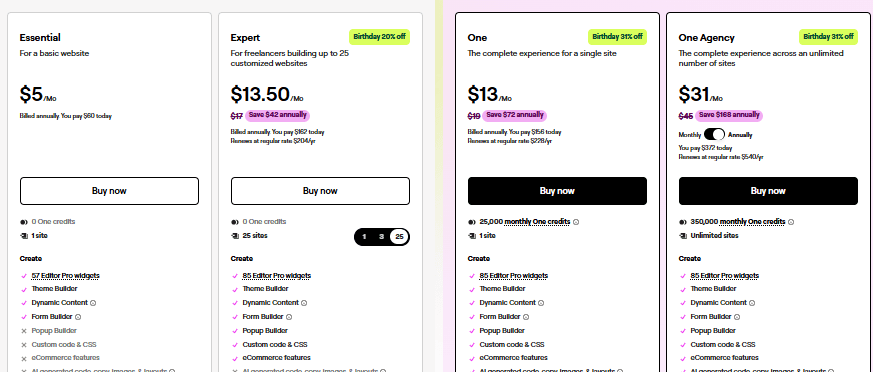
If you manage multiple websites, you will want to look at the higher tiers. The Agency plan costs $372 per year for unlimited websites. The Expert plan costs $162 per year for up to 25 websites.
If you let your subscription expire, your website will not break. Your designs will stay exactly as they are. However, you will lose access to premium templates, customer support, and crucial security updates.
What are the pros and cons of Elementor Premium?
Every software tool comes with distinct trade-offs. You need to weigh the advantages against the limitations.
Pros of Elementor Premium:
- Total design freedom: The Theme Builder gives you control over every pixel of your website, from header to footer.
- Cost consolidation: The built-in Pop-up Builder and Form Builder save you from paying for separate premium plugins.
- Visual editing: The front-end editor eliminates the guesswork of website design.
- E-commerce control: The WooCommerce Builder allows you to design professional, high-converting product pages.
Cons of Elementor Premium:
- Performance overhead: Building complex pages with too many widgets can increase load times if you do not actively optimize your site.
- Yearly recurring cost: There is no one-time payment option, meaning you must pay every year to receive security updates.
- Support delays: Some users report that official customer support can be slow to respond during peak times.
How does Elementor Premium compare to competitors?
Elementor Premium is not the only page builder on the market. You will want to consider how it stacks up against alternatives like Divi and Beaver Builder.
Divi is a popular alternative created by Elegant Themes. It also offers a visual builder and a Theme Builder. Divi tends to bundle its design features heavily into its interface, which some users find cluttered compared to Elementor’s clean sidebar. A major advantage of Divi is that it offers a lifetime pricing option, which appeals to users who hate recurring subscriptions. However, Divi relies heavily on shortcodes. If you ever deactivate the Divi plugin, your content will be left as a messy string of code. Elementor leaves clean HTML behind if deactivated.
Beaver Builder is known for its stability and clean code output. Developers often prefer Beaver Builder because it is highly reliable and rarely conflicts with other plugins. However, Beaver Builder’s interface feels slightly more dated than Elementor’s, and its native widget library is not as extensive. You often have to buy third-party add-ons to match the features included out of the box with Elementor Premium.
Who should use Elementor Premium for their website?
Elementor Premium is a versatile tool, but it shines brightest in specific scenarios.
Freelancers and Agencies: If you build websites for clients, the Expert or Agency plans offer incredible value. You can build completely custom sites rapidly. You can use the Role Manager feature to restrict your client’s access to the editor, preventing them from accidentally breaking the design.
E-commerce Store Owners: If you run a WooCommerce store, standard product pages simply do not convert well enough. Elementor Premium allows you to build custom product pages that highlight your specific value propositions and build customer trust.
Content Creators and Marketers: If you rely on lead generation, Elementor Premium is an excellent choice. The ability to build custom landing pages, integrate email opt-in forms, and trigger targeted pop-ups all from one tool streamlines your entire marketing workflow.
Should you buy Elementor Premium?
Elementor Premium delivers on its promise. It transforms WordPress from a basic blogging platform into a comprehensive website-building engine.
If you are frustrated by the limitations of your current WordPress theme, or if you are tired of paying for separate plugins to handle pop-ups and forms, Elementor Premium is worth the investment. The $59 yearly cost for a single site pays for itself in the time you save and the design flexibility you gain.
If you are a casual hobbyist who just wants a simple text-based blog, the free version of Elementor — or the default WordPress block editor — will likely serve you fine. But if your website generates income, or if you need absolute control over your brand’s digital appearance, Elementor Premium is a reliable, powerful choice.
FAQs about Elementor Premium
How much does Elementor Premium cost per year?
Elementor Premium starts at $59 per year for a single website license. Plans scale up to $99 for 3 websites, $199 for 25 websites, and $399 for 1000 websites.
How long does it take to learn Elementor Premium?
A beginner can learn the basics of the drag-and-drop editor within a few hours. Mastering the advanced Theme Builder and dynamic data features usually takes a few weeks of practice.
What happens if I stop paying for Elementor Premium?
If your subscription expires, your website design will not break and will remain live. However, you will lose access to premium templates, the ability to drag new premium widgets onto the page, and all future security updates.
What are the best alternatives to Elementor Premium?
The most popular alternatives are Divi, which offers a lifetime pricing model, and Beaver Builder, which is favored by developers for its lightweight code output.