Astra is the best WordPress theme for beginners looking for pre-built sites; GeneratePress is the top choice for developers seeking clean code and fast performance; and OceanWP is the ideal option for highly customized e-commerce stores. Choose a theme that aligns with your technical experience and site goals.
Building a WordPress website is a lot like constructing a house. Your hosting provides the plot of land, WordPress itself acts as the foundation, and your theme serves as the architectural blueprint. If you choose a poor blueprint, your house will be difficult to navigate and prone to structural issues. Choose a good one, and you build a fast, reliable home that visitors actually want to spend time in.
For years, three names have dominated the conversation around lightweight, customizable WordPress themes: Astra, GeneratePress, and OceanWP. They all promise fast load times. They all offer extensive customization. They all integrate well with popular page builders like Elementor and Beaver Builder.
But beneath those surface-level similarities, these three WordPress themes are built for entirely different types of users. They handle code, design elements, and e-commerce integrations in distinct ways. If you choose the wrong one for your specific skill level or project scope, you will likely spend hours fighting the theme settings to get the result you want.
This guide will break down exactly how Astra, GeneratePress, and OceanWP work. You will learn the specific strengths and weaknesses of each WordPress theme. By the end, you will know exactly which blueprint is the right fit for your website.
What makes Astra a top WordPress theme choice?
Astra is the chameleon of WordPress themes. Created by Brainstorm Force, it is designed to look like whatever you need it to, with as little effort as possible. Astra holds the title of the most popular non-default theme in the WordPress repository, boasting millions of active installations.
The primary draw of Astra is its massive library of starter templates. Instead of building a website from a blank screen, you can import a complete, professionally designed website in a few clicks. You then replace the text and images with your brand’s style.
Overview
Astra focuses on speed and accessibility. The base theme is incredibly lightweight, requiring less than 50 KB of resources and loading in under half a second on default WordPress installations. It relies on vanilla JavaScript instead of jQuery, which prevents render-blocking issues that often slow down older themes.
Who is this for?
Astra is an excellent choice for beginners, freelance web designers, and marketing agencies. It is perfect for users who need to launch visually appealing sites quickly without writing custom code.
Astra is an excellent choice for beginners, freelance web designers, and marketing agencies. It is perfect for users who need to launch visually appealing sites quickly without writing custom code.
Rewards
Astra integrates seamlessly with the Gutenberg block editor, Elementor, and Beaver Builder. You get access to hundreds of starter sites, which drastically cuts down development time. The customizer is logically organized, so you can easily change global colors, typography, and layout settings from a single central menu.
Astra integrates seamlessly with the Gutenberg block editor, Elementor, and Beaver Builder. You get access to hundreds of starter sites, which drastically cuts down development time. The customizer is logically organized, so you can easily change global colors, typography, and layout settings from a single central menu.
Risks
The free version of Astra is quite limited in its styling options. You will find that many of the best features—like advanced header builders, spacing controls, and premium starter templates—are locked behind the Astra Pro upgrade.
The free version of Astra is quite limited in its styling options. You will find that many of the best features—like advanced header builders, spacing controls, and premium starter templates—are locked behind the Astra Pro upgrade.
Pricing and support for Astra
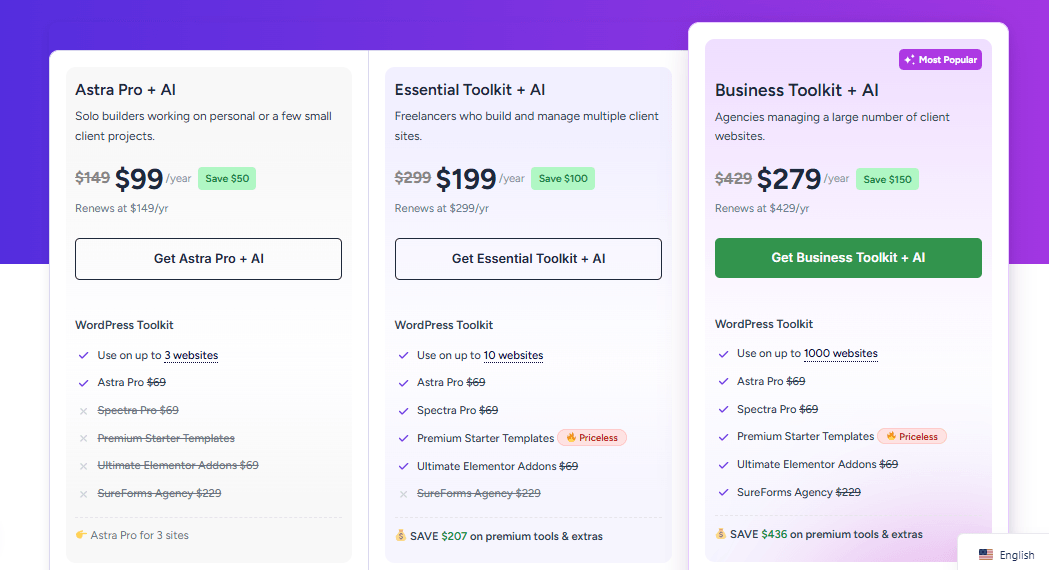
Astra offers a free version in the WordPress repository. The Astra Pro add-on starts at $47 per year. They also offer higher-tier bundles starting at $199 per year that include additional plugins such as Ultimate Addons for Elementor and Schema Pro. Support is handled via a ticketing system, and users generally report fast, helpful responses.
Why do developers prefer the GeneratePress theme?
GeneratePress is the sports car of the WordPress ecosystem. It strips away everything unnecessary to deliver pure, unadulterated performance. Developed by Tom Usborne, GeneratePress has built a fiercely loyal following among users who prioritize clean code and site speed above all else.
Unlike Astra, GeneratePress does not try to be everything to everyone right out of the box. Instead, it provides a rock-solid, incredibly fast foundation. You then use its modular premium plugin, GP Premium, to activate only the specific features you actually need for your project.
GeneratePress is arguably the most efficient theme available. A default installation adds less than 10 KB to your page size. It uses a modular design, meaning you can turn off the WooCommerce module or the secondary navigation module if you do not need them. This keeps your site’s codebase exceptionally clean.
Who is this for?
GeneratePress is the ideal choice for developers, technical SEO specialists, and performance-focused bloggers. It appeals to users who understand WordPress mechanics and prefer to build custom layouts using hooks and filters rather than relying on heavy page builders.
Rewards
GeneratePress offers unmatched stability and speed. Because the code is so clean, you rarely encounter conflicts with other plugins. The premium version includes an advanced Elements module that lets you inject custom code or design blocks into any specific hook area on your site. This gives you complete control over your site’s architecture.
Risks
GeneratePress has a steeper learning curve than Astra. While it does offer a Site Library with pre-built designs, the selection is much smaller than Astra’s. Beginners may find GeneratePress too bare-bones and might struggle to achieve complex designs without knowing a bit of CSS or PHP.
GeneratePress has a steeper learning curve than Astra. While it does offer a Site Library with pre-built designs, the selection is much smaller than Astra’s. Beginners may find GeneratePress too bare-bones and might struggle to achieve complex designs without knowing a bit of CSS or PHP.
Pricing and support for GeneratePress
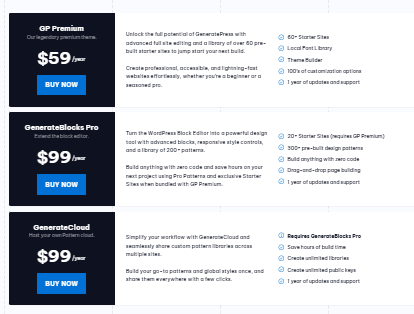
The core GeneratePress theme is free. GP Premium costs $59 per year and allows usage on up to 500 websites. You can also purchase a lifetime license for $249. GeneratePress is famous for its exceptional support forum. Tom Usborne and his team answer questions directly, often providing custom CSS or PHP snippets to solve user problems.
How does OceanWP handle e-commerce and design?
OceanWP is the multi-tool of the WordPress theme world. It comes packed with features, options, and settings that let you tweak almost every element of your site directly in the WordPress Customizer.
While Astra focuses on starter sites and GeneratePress focuses on code performance, OceanWP focuses on deep versatility—especially when it comes to e-commerce. If you are building an online store, OceanWP provides functionality that typically requires purchasing multiple third-party plugins.
Overview
OceanWP offers a massive array of customization options. It uses a companion plugin, Ocean Extra, to manage its advanced features. You can control the layout, header, footer, and sidebar on a per-page or per-post basis. This means your homepage can look completely different from your blog posts or your product pages.
OceanWP offers a massive array of customization options. It uses a companion plugin, Ocean Extra, to manage its advanced features. You can control the layout, header, footer, and sidebar on a per-page or per-post basis. This means your homepage can look completely different from your blog posts or your product pages.
Who is this for?
OceanWP is best for e-commerce store owners and users who want granular control over their site’s design without writing code. If you want to customize the exact padding on your mobile menu or add a persistent cart popup to your WooCommerce store, OceanWP handles it effortlessly.
OceanWP is best for e-commerce store owners and users who want granular control over their site’s design without writing code. If you want to customize the exact padding on your mobile menu or add a persistent cart popup to your WooCommerce store, OceanWP handles it effortlessly.
Rewards
OceanWP’s deep integration with WooCommerce is its biggest selling point. It includes built-in features like a native cart popup, a floating add-to-cart bar, and an off-canvas filtering menu. These features increase conversion rates for online stores and save you from having to buy separate WooCommerce extensions.
OceanWP’s deep integration with WooCommerce is its biggest selling point. It includes built-in features like a native cart popup, a floating add-to-cart bar, and an off-canvas filtering menu. These features increase conversion rates for online stores and save you from having to buy separate WooCommerce extensions.
Risks
Because OceanWP includes so many features, it is the heaviest of the three themes. While it is still fast compared to older, bloated themes, it will not match the raw load times of GeneratePress. Additionally, the sheer volume of settings in the customizer can feel overwhelming for new users.
Because OceanWP includes so many features, it is the heaviest of the three themes. While it is still fast compared to older, bloated themes, it will not match the raw load times of GeneratePress. Additionally, the sheer volume of settings in the customizer can feel overwhelming for new users.
Pricing and support for OceanWP
The base OceanWP theme is free. They sell premium extensions individually, or you can buy the Ocean Core Extensions Bundle starting at $99 per year for a single site. Support is provided via a ticketing system, though response times can be slightly slower than those of GeneratePress or Astra due to the theme’s complexity.
How do Astra, GeneratePress, and OceanWP compare directly?
Understanding each theme individually is helpful, but you need to see how they stack up against each other to make a final decision. Here is how they compare across five critical categories.
How do their performance and speed metrics compare?
GeneratePress wins the performance category. Its modular architecture ensures that no unnecessary code is loaded onto your pages. Astra comes in a very close second, utilizing vanilla JavaScript and maintaining a tiny footprint. OceanWP is the slowest of the three. It requires the Ocean Extra plugin to function fully, which adds additional weight to the page load.
Which theme offers the best customization options?
OceanWP offers the most granular control directly inside the WordPress Customizer. You can tweak almost every margin, color, and font without touching a line of code. Astra strikes a solid middle ground, offering a clean, organized customizer that balances ease of use with flexibility. GeneratePress takes a different approach, relying on its Elements module to allow developers to build custom layouts using hooks.
Which theme is best for e-commerce functionality?
OceanWP is the clear winner for WooCommerce users. Its native e-commerce features—such as the off-canvas filter and floating cart bar—are typically only found in premium WooCommerce plugins. Astra Pro also offers good WooCommerce integration, including grid layouts and quick-view options. GeneratePress provides clean, functional WooCommerce styling, but it lacks the advanced conversion features of OceanWP.
Are these WordPress themes SEO friendly?
All three themes are highly SEO friendly. They output clean HTML5, support schema markup, and are fully responsive for mobile devices. GeneratePress has a slight edge for technical SEO because its codebase is so lean, which helps improve Core Web Vitals scores. Astra and OceanWP are fully compatible with major SEO plugins such as Yoast and Rank Math.
How do their support and community resources compare?
GeneratePress offers the best support in the industry. Their public support forum is a goldmine of information, and the developers provide incredibly technical, accurate answers. Astra has the largest user base, meaning you can easily find third-party tutorials, YouTube videos, and Facebook groups dedicated to the theme. OceanWP has good support, but its documentation is not quite as comprehensive as the other two.
Which WordPress theme should you choose for your site?
Your choice of a WordPress theme dictates how easily you can maintain and grow your website. Here is exactly when to use each option.
When to choose Astra
Choose Astra if you want to build a professional website as quickly as possible. If you are a freelancer building sites for clients, Astra’s massive library of starter templates will save you countless hours. It is the best choice if you rely heavily on page builders like Elementor and want a theme that gets out of your way.
Choose Astra if you want to build a professional website as quickly as possible. If you are a freelancer building sites for clients, Astra’s massive library of starter templates will save you countless hours. It is the best choice if you rely heavily on page builders like Elementor and want a theme that gets out of your way.
When to choose GeneratePress
Choose GeneratePress if you value site speed and clean code above all else. It is the perfect theme for bloggers, developers, and users who want complete control over their site’s architecture through hooks and filters. If you want a site that passes Google’s Core Web Vitals with flying colors, GeneratePress is your blueprint.
Choose GeneratePress if you value site speed and clean code above all else. It is the perfect theme for bloggers, developers, and users who want complete control over their site’s architecture through hooks and filters. If you want a site that passes Google’s Core Web Vitals with flying colors, GeneratePress is your blueprint.
When to choose OceanWP
Choose OceanWP if you are building an online store with WooCommerce. The built-in e-commerce features will save you money on third-party plugins and help increase your sales conversions. It is also a great choice if you want maximum control over your design settings without learning CSS.
Choose OceanWP if you are building an online store with WooCommerce. The built-in e-commerce features will save you money on third-party plugins and help increase your sales conversions. It is also a great choice if you want maximum control over your design settings without learning CSS.
Final thoughts on your WordPress theme selection
Astra, GeneratePress, and OceanWP represent the best of modern WordPress design. They have all moved away from the bloated, slow mechanics of older themes and embraced performance and flexibility.
Your next step is simple. Evaluate your own technical skills and your project requirements. If you want speed and developer control, install GeneratePress. If you need starter sites and quick turnaround times, download Astra. If you are building a customized digital storefront, choose OceanWP. All three offer free versions in the WordPress repository, so you can install them today and test their customizers before committing to a premium license.
FAQs about these WordPress themes.
Which theme is the easiest for a beginner to use?
Astra is the easiest theme for beginners. Its extensive library of pre-built starter sites lets you import a complete website design in one click. You simply replace the placeholder text and images with your own content, bypassing the need to design layouts from scratch.
Do I need a page builder if I use these themes?
No, you do not need a third-party page builder. All three themes are fully compatible with the default WordPress Gutenberg block editor. However, if you prefer the drag-and-drop interface of Elementor or Beaver Builder, all three themes integrate seamlessly with those tools.
Which theme offers the fastest page load times?
GeneratePress consistently tests as the fastest of the three themes. Its base installation is under 10 KB, and its modular design ensures you load only the code for the features you have turned on.
Can I use these themes for a WooCommerce store?
Yes, all three themes fully support WooCommerce. However, OceanWP offers the most robust native e-commerce features, including floating add-to-cart bars and off-canvas product filters, making it the top choice for online stores.
Do I have to pay for a premium license every year?
You can use the free versions of these themes indefinitely without paying. If you purchase a premium license to access advanced features, you will need to renew it annually to continue receiving support and software updates. GeneratePress is the only one currently offering a one-time, lifetime payment option.