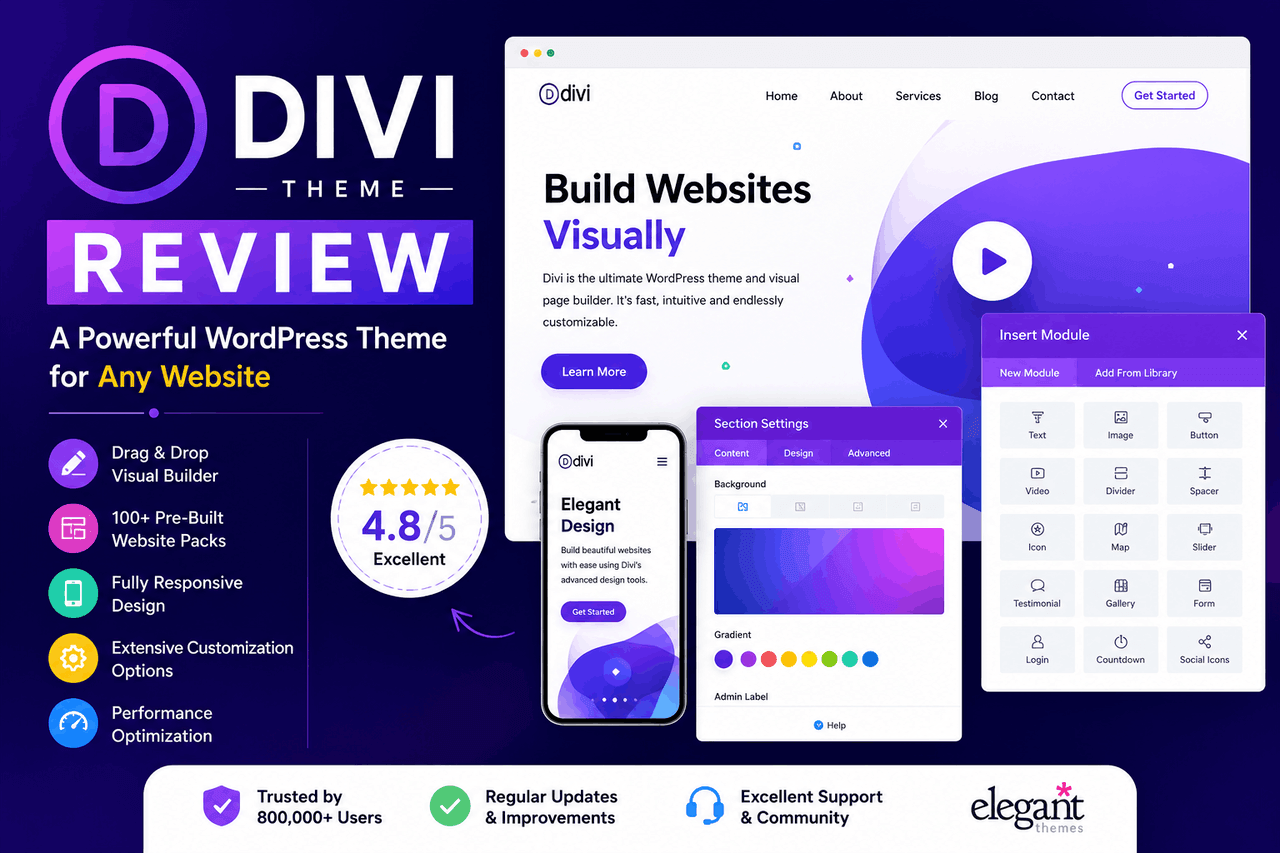
Divi is a popular WordPress theme and visual page builder from Elegant Themes. It gives you drag-and-drop design, hundreds of pre-made layouts, and deep customization without code. It works well for beginners and agencies alike, though it can slow down your site if you’re not careful with optimization.
If you’re building a WordPress website, you’ve probably run into Divi. It’s one of the most widely used premium themes on the web, powering millions of sites across every industry. But popularity alone doesn’t make it right for you.
This review breaks down what Divi actually offers — from its visual builder to its pricing — so you can decide whether it fits your needs. You’ll get a clear look at the features, the performance trade-offs, and how it stacks up against alternatives like Elementor.
By the end, you’ll know who Divi suits best, where it falls short, and whether the cost makes sense for your project. Let’s dig in.
What is Divi, and why is it so popular?
Divi is a WordPress theme and visual page builder created by Elegant Themes. That means you get two things in one: a complete theme framework and a front-end editor that lets you design pages by clicking and dragging, not writing code.
Its popularity comes down to flexibility. You can build almost any kind of site — a blog, an online store, a portfolio, a business homepage — using the same toolset. Add a generous library of templates, an active user community, and a one-time pricing option, and it’s easy to see why so many people stick with it.
That said, flexibility cuts both ways. The same depth that makes Divi powerful can feel overwhelming at first. We’ll cover that as we go.
What are the key features of the Divi Builder?
Divi’s main draw is the Divi Builder, its visual editing engine. So instead of guessing how your changes will look, you see them happen live on the page.
Here’s what stands out.
The visual drag-and-drop builder
The builder works directly on the front end of your site. You click any element — a heading, button, or image — and edit it right there. You can drag sections around, resize columns, and adjust spacing in real time. There’s also a wireframe view for people who prefer a structural layout over the live preview. Both get you to the same result.
Pre-made layouts and templates
Divi ships with more than 2,000 pre-made layouts spread across roughly 200 full website packs. So if you don’t want to start from scratch, you don’t have to.
These cover common categories — restaurants, gyms, agencies, online stores, and more. You import a pack, swap in your own text and images, and you’re most of the way to a finished site. That’s a real time-saver for beginners and busy agencies.
Design and styling options
Divi gives you control over fonts, colors, spacing, borders, animations, and filters for nearly every element. You can set global styles so your brand stays consistent across the whole site. You can also add custom CSS for finer control.
The result is a builder that suits both people who never touch code and people who want to tweak every pixel.
Is Divi easy to use for beginners?
Divi is beginner-friendly in its core actions, but it has a learning curve for everything beyond the basics. So expect a few hours of exploring before it clicks.
For newcomers, the pre-made layouts do a lot of heavy lifting. You can launch a decent-looking page on day one just by importing a template and editing the content. The visual editor also removes the fear of breaking something, since you can see every change as you make it.
For experienced designers, the depth pays off. Global elements, custom CSS, conditional display logic, and dynamic content let you build complex layouts and reuse them across pages. Theme Builder, in particular, lets you design custom headers, footers, and post templates — useful for larger projects.
However, the sheer number of settings can overwhelm first-timers. The interface puts a lot of options in front of you at once. Give yourself time, lean on the template library early, and the complexity becomes an asset rather than a hurdle.
How does Divi affect website speed and SEO?
Divi can slow down your site if left unoptimized, but recent updates have narrowed that gap significantly. So performance depends heavily on how you set it up.
The honest trade-off: feature-rich page builders add code to your pages, and that code can hurt load times. Divi historically had a reputation for bloat. In response, Elegant Themes added performance features such as dynamic CSS, deferred JavaScript, and critical CSS generation. These reduce the amount of code loaded on each page.
To keep a Divi site fast, you’ll typically want to:
- Use a quality caching plugin
- Compress and lazy-load images
- Choose reliable hosting
- Limit heavy animations and third-party scripts
On SEO, Divi doesn’t block your rankings. It produces standard, crawlable HTML and works with major SEO plugins like Yoast and Rank Math. That said, search engines care about speed and Core Web Vitals, so the same optimization steps that improve load times also help your SEO. Get the performance basics right, and Divi won’t hold you back.
How much can you customize Divi without coding?
Divi lets you customize almost every visual aspect of your site without writing a single line of code. So you control the look without needing a developer.
You can adjust layouts, colors, typography, spacing, hover effects, and responsive behavior for desktop, tablet, and mobile — all through the visual interface. The Theme Builder extends this to site-wide elements, letting you design custom templates for blog posts, archives, product pages, and 404 pages.
For those who do know code, Divi stays flexible. You can add custom CSS to individual modules or apply it globally. So the theme grows with your skills rather than capping them.
The main limit is structural. Divi works best within its own module system, so deeply custom functionality may still need a developer or extra plugins.
What does Divi integrate with?
Divi works with most major WordPress plugins and third-party services, so it fits into an existing toolset without much friction.
It supports WooCommerce for online stores, giving you Divi modules to design product and shop pages. It connects with email marketing services such as Mailchimp, ConvertKit, and others through built-in opt-in modules. It also plays well with popular SEO, caching, and form plugins.
Elegant Themes also offers Divi Marketplace, a hub for third-party extensions, child themes, and layout packs. So when the core features don’t cover a need, there’s often an add-on that does.
That said, stacking too many plugins on top of Divi can affect performance. Add what you need, and skip what you don’t.
How much does Divi cost?
Divi uses a subscription and lifetime pricing model through Elegant Themes, and both options unlock the full toolset. So you pay once or yearly — not per site.
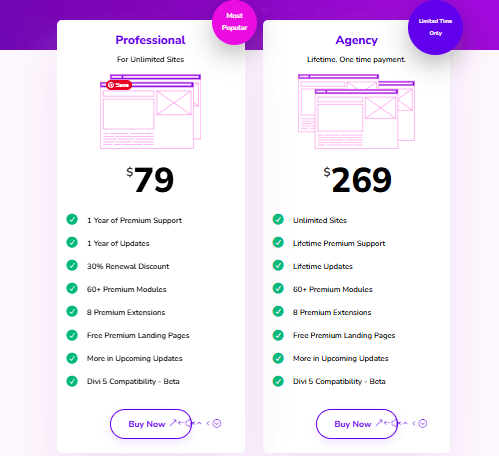
Both plans include the Divi theme, the Divi Builder, the Extra theme, the Bloom email opt-in plugin, the Monarch social sharing plugin, premium support, and use on unlimited websites. That unlimited-sites policy is a big part of Divi’s value, especially for freelancers and agencies managing many client sites.
The lifetime option appeals if you plan to use Divi for years. The yearly plan makes sense if you want to test it first or prefer smaller recurring costs.
What are the pros and cons of Divi?
Divi offers strong value and deep flexibility, but it asks for patience and careful optimization in return. Here’s the balanced view.
Pros:
- Powerful visual, front-end builder
- More than 2,000 pre-made layouts
- Use on unlimited websites with one license
- Lifetime pricing option available
- Deep customization without code
- Theme Builder for site-wide templates
- An active community and a large extension marketplace
Cons:
- Steeper learning curve for advanced features
- Can slow your site without optimization
- Content can rely on Divi’s shortcodes, making it harder to switch themes later
- The interface can overwhelm first-time users
Divi vs Elementor: which should you choose?
Divi and Elementor are the two biggest WordPress page builders, and the right pick depends on how you prefer to pay and work. So compare them on cost and workflow, not features alone — both are highly capable.
Divi is a complete theme plus builder, while Elementor is primarily a plugin that works with most themes. On pricing, Divi offers a lifetime option and unlimited sites on every plan. Elementor uses annual pricing tiered by the number of sites, which can cost more over time if you manage many websites.
On workflow, both offer strong visual editing. Many users find Elementor’s interface a little cleaner for beginners, while Divi’s preset layout library and global styling give it an edge for building multiple sites quickly.
Choose Divi if lifetime pricing and unlimited sites matter most to you, especially as a freelancer or agency. Choose Elementor if you want a slightly gentler interface and prefer to keep your existing theme.
Other Divi alternatives worth considering
Beyond Elementor, a few other builders and themes compete with Divi, so it helps to know your options.
- Beaver Builder: A stable, developer-friendly page builder known for clean code and reliability.
- Astra: A lightweight theme that pairs with page builders and prioritizes speed.
- WPBakery: A long-standing builder often bundled with premium themes.
Each suits a slightly different priority — speed, code quality, or bundled value. Match the tool to what matters most for your project.
Is Divi the right choice for your website?
Divi is a strong, flexible choice for most WordPress users, especially if you value visual design control, a large template library, and pricing that covers unlimited sites. So for freelancers, agencies, and hands-on site owners, it offers a lot for the money.
It’s not perfect. The learning curve is real, and you’ll need to put some work into performance. But none of these issues are dealbreakers — they’re trade-offs you can manage with a bit of time and the right setup.
If you want one toolkit that handles nearly any kind of site, and you don’t mind a short ramp-up period, Divi is well worth a serious look. Try it through Elegant Themes, build a test page, and see how it feels in your own hands. That hands-on test will tell you more than any review.
Frequently asked questions
Is Divi good for beginners?
Yes. Divi’s pre-made layouts and visual editor make it approachable for newcomers, since you can build a page by editing a template rather than starting from scratch. The advanced features take longer to learn, but the basics are beginner-friendly.
Does Divi slow down your website?
Divi can slow your site if it’s unoptimized, but it doesn’t have to. Built-in performance features, a caching plugin, optimized images, and good hosting keep a Divi site running fast.
Is Divi a one-time payment or a subscription?
Both. Divi offers a yearly subscription (around $79/year) and a lifetime license (a one-time payment of around $269). Both cover unlimited websites. Check Elegant Themes for current pricing.
Can you use Divi on multiple websites?
Yes. Every Divi plan, yearly or lifetime, allows use on unlimited websites with a single license. That makes it popular with freelancers and agencies.
What happens if you stop using Divi?
Because Divi builds content with its own shortcodes, switching to another theme can leave leftover code in your posts and pages. You can still keep your content, but you may need to clean it up or rebuild key pages.